Practical Guide

Remove Metadata Before Posting on Social Media

Publish social images with confidence by removing hidden metadata before every upload.

Social-safe metadata checks

  • OK Sanitize before post
  • OK Verify scheduler output
  • OK Archive safe copy

Quick summary

  • Pre-publish privacy checklist for creators and agencies
  • Repeatable process for high-volume social posting
Metadata & Privacy Beginner 6 min read Updated 2026-02-24 Last verified 2026-02-24

Quick Summary

Publish social images with confidence by removing hidden metadata before every upload.

Changelog: content updated 2026-02-24, references verified 2026-02-24.

Field Note

Social platforms handle metadata differently; the safest model is to sanitize before upload every time rather than trust platform behavior.

Creator publishing cadence

Batch-clean weekly content so privacy control does not slow posting schedules.

Brand account approvals

Insert metadata verification into pre-publish QA to catch misses before campaigns go live.

UGC republishing

Sanitize received files before reposting to avoid inheriting hidden metadata from contributors.

Pre-publish QA questions

  • Is metadata cleaning required before every social channel upload?
  • Do approval checklists include a privacy verification step?
  • Are raw user-submitted files ever posted without sanitation?

Privacy Workflow Deep Dive

Metadata safety standards, sanitation defaults, and high-risk publishing scenarios.

Sources: 2 Defaults: 3 Edge Cases: 3 Modules: 3 Advanced Notes: 3
Standards and References As of 2026-02-24
Default settings snapshot 3 rows
Use case Setting Baseline Target
Public social upload Strip GPS/device/author tags Sanitize before every publish No identifying metadata
Client deliverable Sanitized copy + internal original retention Verification step required Zero accidental leakage
Team content archive Store originals separately Publish-ready folder only Clear governance and reuse safety
Before / After proof pattern Expand

Before

Original files posted directly with hidden location/device traces.

After

Metadata sanitization added as a mandatory pre-publish step.

Typical outcome

Reduced privacy risk and cleaner compliance posture for external sharing.

Edge-case clinic 3 cases
Issue Cause Fix
Location still appears after cleanup Not all metadata namespaces were removed Verify GPS and maker/device fields explicitly after processing.
Team occasionally posts raw originals No mandatory publish gate Require sanitized output folder as only publish source.
Policy drifts over time No audit cadence Add periodic spot checks and refresh SOP quarterly.
Advanced Social Privacy Notes 3 notes
  • Assume platform metadata behavior varies and sanitize before every upload.
  • Add a social pre-publish privacy gate to campaign launch checklists.
  • Treat UGC reposting as high-risk and enforce metadata cleanup on inbound assets.
Guide-specific execution modules 3 modules

Platform Behavior Comparison

Channel Type Metadata Handling Safe Assumption
Social apps (varies) Behavior differs by app/version/path Assume metadata may persist
Cross-post/scheduler tools Can preserve originals Sanitize before scheduling
UGC reposting flows Unknown source metadata Always sanitize inbound assets

Pre-post Checklist for Scheduled Tools

  • Sanitize files before they enter scheduler libraries.
  • Use publish-ready folder as only source for automation.
  • Run a final random metadata spot-check before campaign launch.

UGC Repost Safety Workflow

  • Treat all inbound UGC as untrusted metadata sources.
  • Sanitize and re-export before reposting.
  • Keep consent and sanitation logs per campaign.

Who this is for

  • Creators posting personal or client media publicly
  • Marketing teams running social media workflows
  • Developers adding privacy-safe upload pipelines

What success looks like

  • Prevent accidental leakage of location and device metadata.
  • Build a repeatable clean-before-publish checklist.
  • Keep visual quality intact while removing sensitive fields.

Tested on

  • Remove Metadata Before Posting on Social Media: iOS and Android camera-origin files with GPS/device tags present.
  • Remove Metadata Before Posting on Social Media: Desktop upload/share workflows used in editorial and client handoff paths.
  • Remove Metadata Before Posting on Social Media: Field-level verification using EXIF inspection after cleanup.

Scope and limits

  • Remove Metadata Before Posting on Social Media: Guide covers image metadata only, not full account/security controls.
  • Remove Metadata Before Posting on Social Media: Platform-side stripping may change; sanitize before every publish.
  • Remove Metadata Before Posting on Social Media: Retention and legal obligations require org-specific policy review.

Key takeaways

  • Pre-publish privacy checklist for creators and agencies
  • Repeatable process for high-volume social posting

Common mistakes to avoid

  • Assuming social platforms always strip metadata for you.
  • Removing metadata inconsistently across team members.
  • Skipping validation after metadata cleanup.

30-minute action plan

  1. 1 0-10 min: Identify high-risk metadata fields for your workflow.
  2. 2 10-20 min: Run cleanup on a sample set and verify output.
  3. 3 20-30 min: Standardize a team-ready publishing checklist.

Related guides in this track

Remove EXIF Location

Remove GPS location data before sharing photos so private places never leak by accident.

5 min read

Execution depth

Fast Pass

15-20 min

Fix the highest-risk issue first and ship a validated minimum improvement.

Standard Rollout

45-60 min

Apply the full guide workflow with QA checks before publishing broadly.

Team Standardization

90+ min

Convert the workflow into reusable presets, checklists, and team operating rules.

Troubleshooting Signal Likely Cause Recommended Fix
Location still appears after cleanup Not all metadata blocks were removed Re-run cleanup and verify GPS fields explicitly before sharing.
Team publishes original camera files No enforced pre-publish checklist Require sanitized outputs as the only publishable asset.
Unclear privacy risk on new channels Platform behavior varies by app and upload mode Assume metadata may persist and clean files before every upload.

Post-publish KPI checks

  • Files with GPS fields removed
  • Privacy incidents avoided in publishing flow
  • Compliance with pre-publish cleanup checklist

Detailed implementation blueprint

1

Risk Mapping

Identify where sensitive metadata can leak in your content pipeline.

  • List all photo sources: mobile, DSLR, screenshots, third-party submissions.
  • Mark destinations where files are public or shared externally.
  • Prioritize high-risk fields like GPS, device IDs, and creator metadata.

Done when: You have a clear risk map of sources, channels, and metadata exposure points.

2

Sanitization Workflow

Create a clean-before-publish process that is easy to execute under pressure.

  • Define the exact tool sequence for stripping metadata and verifying output.
  • Add a mandatory check in publishing SOPs before final upload.
  • Keep sanitized files as the only accepted publish-ready versions.

Done when: Every publish path includes metadata cleanup and verification as a required step.

3

Team Enforcement

Ensure privacy hygiene is consistent across contributors and campaigns.

  • Assign ownership for validating metadata on high-visibility posts.
  • Add spot checks for randomly sampled assets each week.
  • Log misses and close gaps with quick retraining or checklist updates.

Done when: Metadata cleanup compliance is consistent and exceptions are rare and tracked.

4

Governance & Review

Convert cleanup from one-off behavior into policy-level operating practice.

  • Schedule recurring policy review as platform and legal requirements evolve.
  • Keep a lightweight incident log for privacy near-misses and fixes.
  • Update onboarding docs so new contributors follow the same standards.

Done when: Privacy controls are documented, repeatable, and resilient to team changes.

Quality gate checklist

  • GPS and identifying fields are removed before any external publish.
  • Metadata cleanup is mandatory in the publishing checklist.
  • Random weekly spot checks confirm sanitized outputs are being used.
  • Policy/docs include explicit links to privacy and escalation contacts.

Advanced wins

  • Separate internal archival originals from externally publishable sanitized versions.
  • Add lightweight privacy audit logs to make compliance reviews easier.
  • Run periodic retro checks on high-reach posts to catch process drift early.

Execution next step

Run a primary tool action, review one companion guide, then apply the rollout checklist.

Visual Blueprint

Social Media Pre-Publish Privacy Flow

Follow this sequence to clean metadata from campaign assets before they go live on any platform.

1 Step 1

Identify Platform Handling

Check whether the target platform strips, preserves, or partially removes metadata on upload.

2 Step 2

Strip Sensitive Fields

Remove GPS, device IDs, and timestamps — do not rely on the platform to do it for you.

3 Step 3

Preview Cleaned Output

Verify the cleaned file looks correct and that no metadata was stripped that affects display quality.

4 Step 4

Schedule with Confidence

Queue the sanitised asset for publishing knowing it carries no hidden personal data.

Unvetted Social Posts vs Privacy-Checked Campaign Assets

Cleaning metadata before scheduling prevents accidental data exposure on public platforms.

Before: Unvetted Social Posts

Risk: Public data exposure
  • Campaign photos are posted directly from phones with GPS and device data intact.
  • Teams assume platforms strip all metadata — but many preserve or only partially remove it.
  • A single unvetted post can expose client locations, staff home addresses, or shooting schedules.

After: Privacy-Checked Campaign Assets

Outcome: Privacy-safe campaigns
  • Every image is run through metadata cleanup before entering the publishing queue.
  • Platform-specific metadata behavior is documented so teams know what to trust.
  • Campaign assets are privacy-checked as a standard step, not an afterthought.

Clean Asset vs Metadata Leak

A quick comparison of what a privacy-checked asset looks like versus an unvetted one.
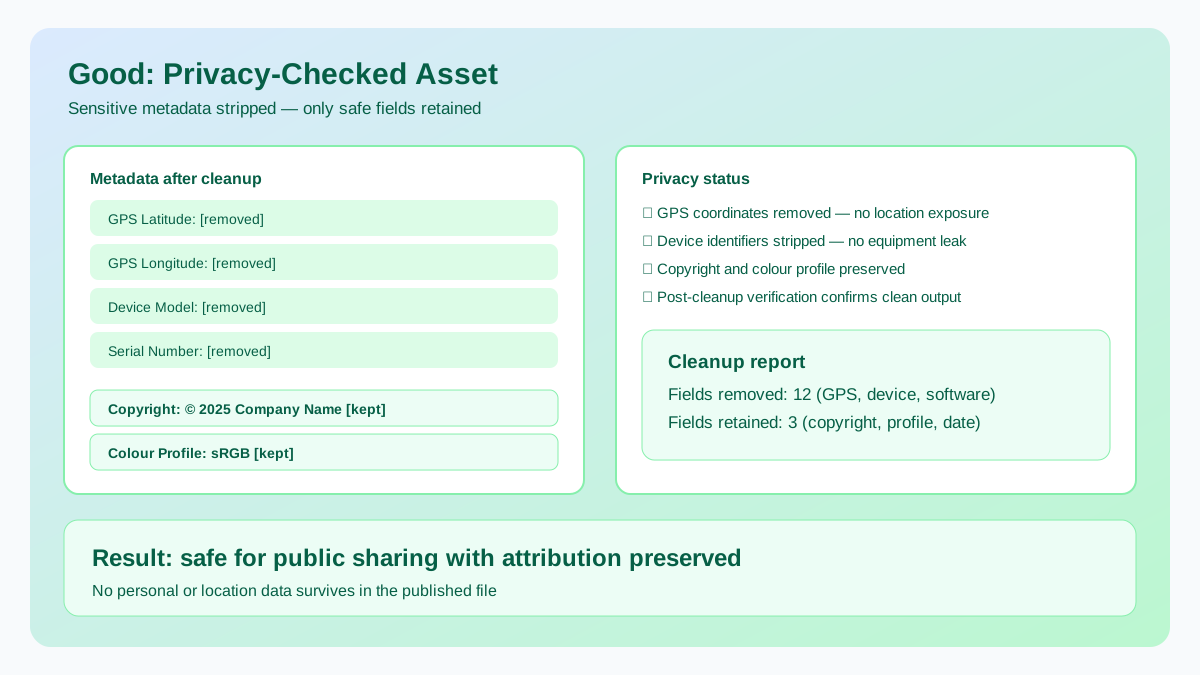
Good: Privacy-Checked Asset

Preferred
Good: Privacy-Checked Asset

GPS stripped, device ID removed — only copyright and colour profile retained.
  • GPS coordinates removed — no location data in the published file.
  • Device identifiers and serial numbers stripped before sharing.
  • Safe metadata (copyright, colour profile) preserved for proper attribution.

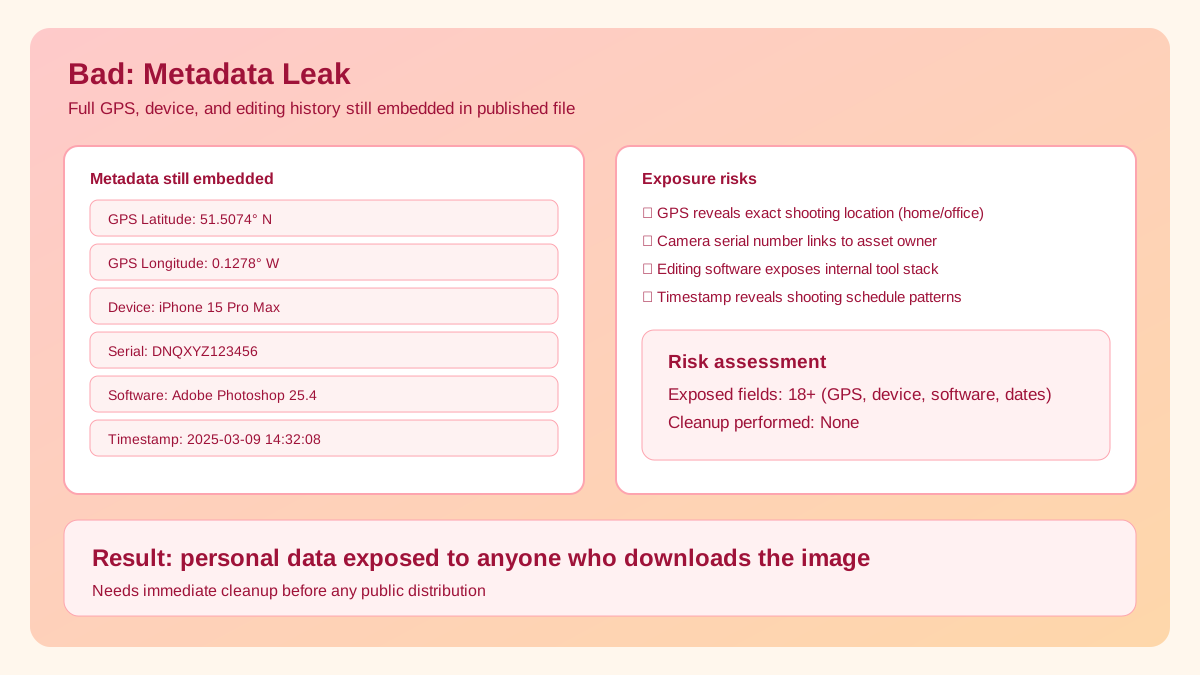
Bad: Metadata Leak

Avoid
Bad: Metadata Leak

Full GPS coordinates, camera serial number, and editing history still embedded.

  • ! GPS lat/long reveals the exact location where the photo was taken.
  • ! Camera serial number and lens model expose equipment details.
  • ! Edit history and software version leak internal workflow information.

Platform Risk Snapshot

Assume metadata may survive unless you verify otherwise. Platform behavior can change without notice.

Context Metadata Behavior Best Practice
Public social feed upload Varies by platform/app Pre-clean every file before upload.
Direct share/messaging Often preserves more metadata Treat as high-risk and sanitize first.
Cross-posting tools Inconsistent transformations Use one clean master output for distribution.

Simple Pre-Post Workflow

  1. Step 1

    Finalize edits first so you do not accidentally re-export an unclean original later in the publishing chain.

  2. Step 2

    Run file through EXIF Metadata Cleaner.

  3. Step 3

    Download sanitized copy and verify metadata removal.

  4. Step 4

    Optional: compress cleaned file before posting for faster load.

High-Risk Sharing Scenarios

  • Photos taken at home, office, or school.
  • Children/family event posts.
  • Client location or sensitive on-site photos.
  • Travel photos posted in near real time.

Team Policy Tip

For teams, set a hard policy: never post original camera files. Only sanitized derivatives should be considered publish-ready assets.

Frequently Asked Questions

It varies significantly. Facebook, Instagram, and Twitter strip most EXIF data on upload, but WhatsApp, Telegram, Discord, forums, and many other platforms may not. Some apps strip GPS but keep camera info. Since policies change without notice and behavior differs between mobile and web uploads, always strip metadata yourself before sharing.
No. EXIF cleanup removes only hidden embedded fields (GPS, camera model, timestamps, software), not visible pixels. Your image dimensions, colors, and visual quality remain completely unchanged. The file size may decrease slightly because metadata can add 10-50 KB to each image, but this is a bonus, not a quality tradeoff.
Yes. Screenshots often contain less metadata than camera photos, but they can still embed your device model, OS version, screen resolution, and timestamp. Some screen capture tools also embed app-specific metadata. Sanitizing all images before sharing publicly is a safe default habit that costs nothing and prevents accidental data exposure.
Any original camera photo that may reveal sensitive information: home or workplace GPS coordinates, daily routine patterns from timestamps, device identity, or high-resolution images of documents or screens. Always strip metadata from personal and client photos before sharing on social media, marketplaces, or forums.