Website format selection matrix
- OK Photo -> AVIF/WebP
- OK Logo/UI -> PNG/SVG
- OK Fallback -> JPG/PNG
Practical Guide
Use one actionable framework to choose JPG, PNG, WebP, AVIF, SVG, or GIF by context.
Website format selection matrix
Quick summary
Use one actionable framework to choose JPG, PNG, WebP, AVIF, SVG, or GIF by context.
Changelog: content updated 2026-02-24, references verified 2026-02-24.
Field Note
The winning strategy is role-based formatting: define decisions per asset purpose and enforce them in templates and publishing SOPs.
Prioritize modern photo formats and tight dimension control because these assets dominate transfer cost and LCP risk.
Use SVG/PNG where edge fidelity and transparency stability matter more than absolute byte minimization.
Adopt channel-aware presets to prevent over-sized, crop-prone exports from slowing campaign launch.
Pre-publish QA questions
Format Ops Deep Dive
Reference-backed format defaults, quality baselines, and conversion edge-case fixes.
| Use case | Setting | Baseline | Target |
|---|---|---|---|
| Hero or landing photo | AVIF/WebP + JPG fallback | 1600-2000 px long edge | 120-260 KB |
| Content/editorial image | WebP or optimized JPG | 900-1400 px long edge | 70-180 KB |
| Transparent brand/UI graphic | PNG or SVG | Exact render size x2 | Under 180 KB |
Before
Mixed-format uploads, inconsistent quality presets, and large payload variance across templates.
After
Role-based format rules with explicit fallbacks and constrained export dimensions.
Typical outcome
Fewer upload failures, faster pages, and more predictable visual QA outcomes.
| Issue | Cause | Fix |
|---|---|---|
| Assets look soft after conversion | Wrong export dimensions or over-compression | Match real display size and raise quality gradually with side-by-side checks. |
| Platform rejects uploads intermittently | Unsupported format in some channels | Define per-channel fallback format and enforce it in workflow. |
| Files are unexpectedly huge | Using transparency formats for photo-heavy assets | Reclassify asset type and switch to photo-friendly format. |
| Asset Type | Primary Choice | Channel Caveat |
|---|---|---|
| Photo hero/content | AVIF or WebP | Maintain JPG fallback for strict channels |
| Logo/UI icon | SVG/PNG | Use PNG fallback where SVG support is inconsistent |
| Animation/social visual | WebP/video workflow | Validate preview crop and compatibility |
| Channel | Exception | Fallback Rule |
|---|---|---|
| Ad networks | Format restrictions vary | Provide JPG/PNG compliant exports |
| Email clients | Modern format support inconsistent | Default to JPG/PNG |
| Third-party embeds | Opaque processing pipeline | Use safest compatible format set |
Who this is for
What success looks like
Tested on
Scope and limits
Key takeaways
Common mistakes to avoid
30-minute action plan
Recommended tool stack
Related guides in this track
Convert iPhone HEIC photos into clean JPG files that upload everywhere without quality surprises.
6 min read
Choose AVIF or WebP confidently using real tradeoffs for quality, speed, and browser coverage.
8 min read
Pick the right default for photo-heavy pages with practical quality and payload checkpoints.
7 min read
Stop guessing between PNG and JPG with clear rules for logos, UI assets, and product photos.
7 min read
Execution depth
Fast Pass
15-20 min
Fix the highest-risk issue first and ship a validated minimum improvement.
Standard Rollout
45-60 min
Apply the full guide workflow with QA checks before publishing broadly.
Team Standardization
90+ min
Convert the workflow into reusable presets, checklists, and team operating rules.
| Troubleshooting Signal | Likely Cause | Recommended Fix |
|---|---|---|
| Output looks soft or fuzzy | Aggressive compression or wrong export dimensions | Re-export at correct display size and raise quality incrementally. |
| Uploads fail on target platform | Unsupported format or oversized file | Convert to a safer fallback format and compress before retrying. |
| Unexpectedly large file size | Inefficient source format or metadata bloat | Run conversion + compression and strip unnecessary metadata. |
Post-publish KPI checks
Detailed implementation blueprint
Map where each image type appears and where format mismatches are causing bloat or breakage.
Done when: You have a categorized inventory and the top three format issues prioritized.
Run representative conversions with side-by-side quality checks before broad rollout.
Done when: You have approved format rules per asset type with validated quality and size results.
Apply rules in templates and upload workflows with safe fallback behavior.
Done when: New uploads follow the standard and critical templates use optimized formats.
Keep format decisions current as browsers, workflows, and channels evolve.
Done when: The format policy is stable, documented, and verified by ongoing metrics.
Quality gate checklist
Advanced wins
Execution next step
Run a primary tool action, review one companion guide, then apply the rollout checklist.
Use one repeatable decision path so teams do not re-debate formats on every upload.
Photo, transparent graphic, vector icon, or animation.
Use AVIF/WebP/JPG/PNG/SVG based on intent and compatibility.
Set clear fallback behavior for legacy channels and tools.
Check payload, visual fidelity, and page-level metrics.
Pick format by intent: photos optimize for byte efficiency, brand assets optimize for edge fidelity, and UI graphics optimize for predictability across devices.
| Asset Type | Best Format | Fallback | Why |
|---|---|---|---|
| Photos / hero images | AVIF or WebP | JPG | Great compression with acceptable visual quality. |
| Logos with transparency | PNG or SVG | WebP | Sharp edges and transparency support. |
| UI icons / simple vectors | SVG | PNG | Resolution-independent and often smallest for vector shapes. |
| Animations | WebP (animated) | GIF | Better quality/size than GIF in most modern browsers. |
Use this when you need a confident default before you open any export settings.
If
It is a photo or hero image
Then
Start with AVIF or WebP
Keep a JPG fallback for older systems and third-party channels.
If
It needs transparency with sharp edges
Then
Use SVG or PNG
Choose SVG when the asset is truly vector; PNG when it is raster artwork.
If
It is a logo, icon, or simple illustration
Then
Prefer SVG
Scale stays crisp and payload is often smallest.
If
It is animated
Then
Try animated WebP or APNG before GIF
Use GIF only when the destination has stricter support limits.
JPG
A dependable fallback for photo assets when you need near-universal compatibility across CMS, email, and older integrations.
WebP
A strong day-to-day default for most web photo delivery pipelines with excellent size-to-quality balance.
AVIF
Often the smallest modern option for complex photography, especially on high-traffic templates where byte savings compound quickly.
The biggest gains usually come from replacing one-size-fits-all format choices.
Choosing the right format by asset type is the single highest-impact decision for image quality and performance.
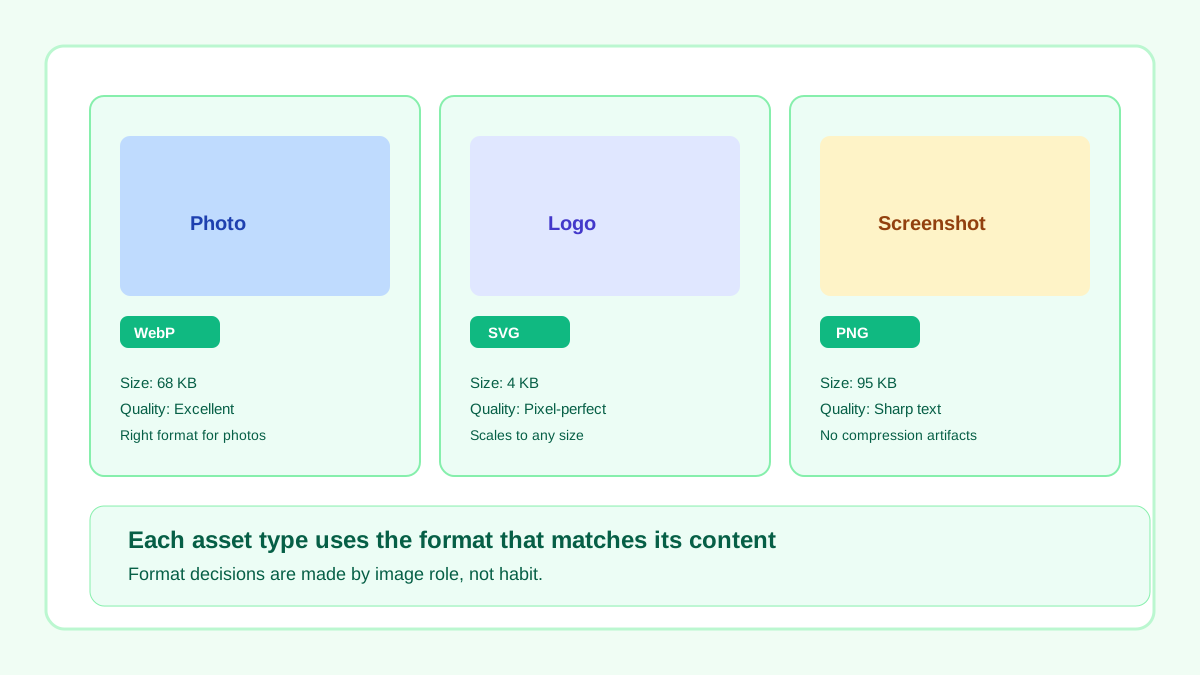
Photos use WebP, logos use SVG, screenshots use PNG — each format matches its content type.
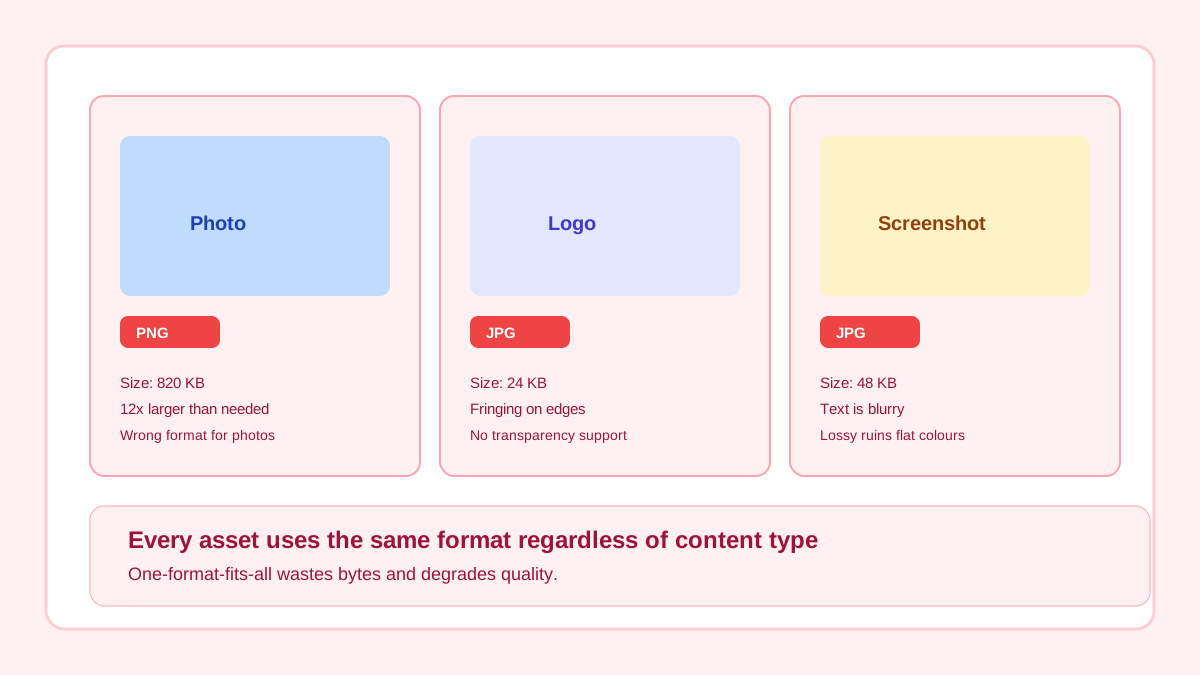
All assets use the same format regardless of content — photos bloat as PNG, logos degrade as JPG.
Guide Visual
This annotated view is a better training aid than a static grid because it mirrors the actual decision sequence teams should follow.
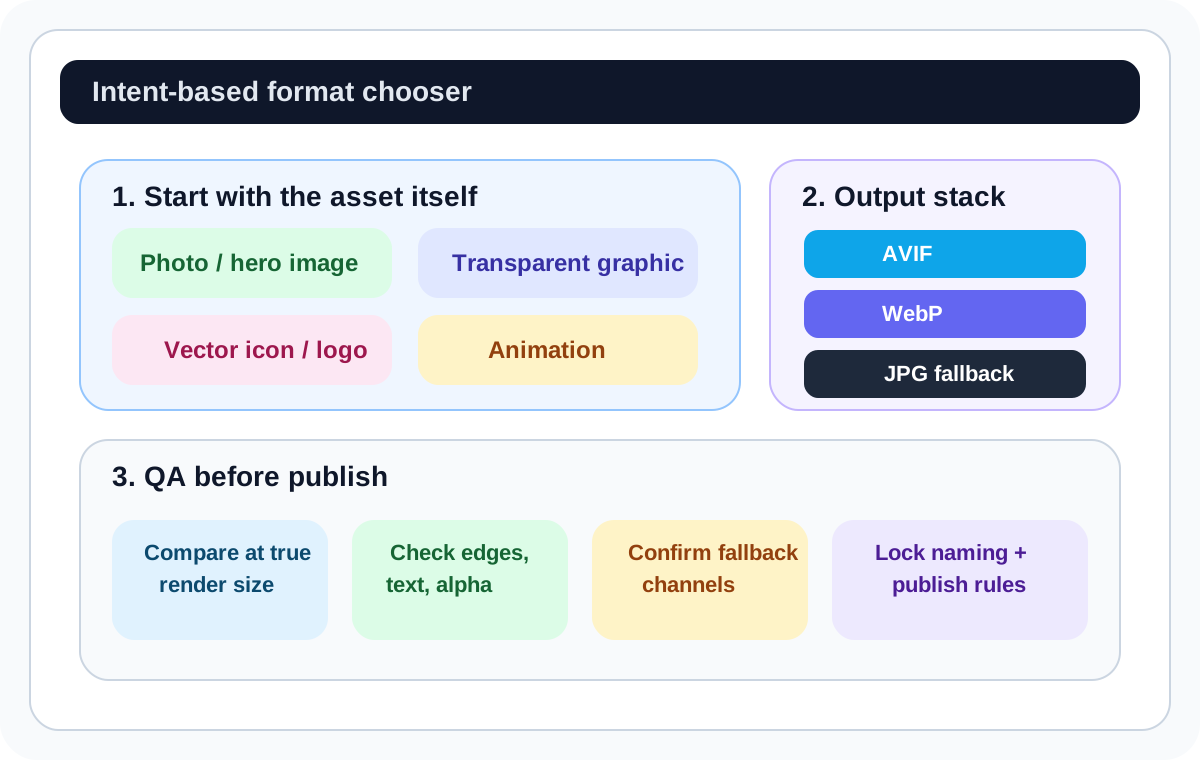
Format decisions become durable when the markup already knows how to fall back cleanly. This is the production-safe baseline for photo-heavy assets.
<picture>
  <source type="image/avif" srcset="/images/hero-1280.avif" />
  <source type="image/webp" srcset="/images/hero-1280.webp" />
  <img
    src="/images/hero-1280.jpg"
    width="1280"
    height="720"
    alt="Product hero image" />
</picture>Run this as a repeatable workflow with sample-based QA first, then template-level rollout. That keeps quality control tight while still moving quickly.
Step 1
Convert representative source files with Image Format Converter, grouped by use case (hero, product, editorial, UI).
Step 2
Choose primary delivery per asset category, then define fallback behavior explicitly for legacy browsers and third-party channels.
Step 3
Run approved outputs through Image Compressor to remove avoidable transfer weight before publishing.
Step 4
Schedule monthly audits to replace oversized legacy files and prevent format drift as new content is added.
Related workflow
Explore related tools to keep your workflow fast and consistent.
Keep moving
Deep comparison for modern delivery strategies.
Open tool
Keep moving
Convert assets to format-specific outputs quickly.
Open tool
Keep moving
Detailed PNG vs JPG decision framework for common use cases.
Open tool
