Brand palette token system
- OK Base ramps
- OK Semantic tokens
- OK Usage governance
Practical Guide
Turn one brand color into a production-ready palette with semantic tokens and accessibility checks.
Brand palette token system
Quick summary
Turn one brand color into a production-ready palette with semantic tokens and accessibility checks.
Changelog: content updated 2026-03-01, references verified 2026-02-24.
Field Note
A strong palette system turns subjective color choices into repeatable tokens teams can use with confidence.
Build semantic color tokens from one brand hue to keep UI and marketing aligned.
Map legacy color usage to new tokens so rollout avoids inconsistent one-off overrides.
Standardize palette naming so designers and engineers reference the same values.
Pre-publish QA questions
Channel Delivery Deep Dive
Storefront/social defaults, channel pitfalls, and share-safe implementation notes.
| Use case | Setting | Baseline | Target |
|---|---|---|---|
| Storefront catalog grid | Single ratio policy | 1000-1200 px long edge | Stable card layout and faster loads |
| Product detail imagery | Higher-detail variant + compression | 1600-2400 px long edge | Clear zoom without bloat |
| Social OG campaign art | 1200x630 with safe zones | Center-weighted composition | Consistent preview fidelity |
Before
Uneven ratios, over-sized exports, and repetitive channel-specific rework.
After
Preset-based resizing/compression with platform-safe crop rules.
Typical outcome
Cleaner storefronts and quicker campaign asset turnaround.
| Issue | Cause | Fix |
|---|---|---|
| Catalog cards look uneven | Mixed aspect ratios in source uploads | Apply one ratio standard per storefront template. |
| Social previews crop key message | No safe-zone composition | Use center-safe text/brand zones in OG templates. |
| Teams keep re-exporting manually | No reusable presets | Create named presets per channel and enforce them. |
color.primary.500
color.surface.default
color.text.primary
color.status.successWho this is for
What success looks like
Tested on
Scope and limits
Key takeaways
Common mistakes to avoid
30-minute action plan
Recommended tool stack
Related guides in this track
Use platform-safe Open Graph dimensions so social previews look clean and clickable.
6 min read
Audit live Open Graph and X metadata, debug broken social previews, and fix the highest-impact issues first.
9 min read
Prepare Shopify and WooCommerce images with consistent sizing, better quality, and faster load times.
8 min read
Build clean, scalable shadow stacks that improve hierarchy without muddying interfaces.
8 min read
Execution depth
Fast Pass
15-20 min
Fix the highest-risk issue first and ship a validated minimum improvement.
Standard Rollout
45-60 min
Apply the full guide workflow with QA checks before publishing broadly.
Team Standardization
90+ min
Convert the workflow into reusable presets, checklists, and team operating rules.
| Troubleshooting Signal | Likely Cause | Recommended Fix |
|---|---|---|
| Product imagery looks inconsistent | Mixed dimensions and export settings | Standardize channel-specific presets and enforce them in workflow. |
| Social previews crop key content | Wrong canvas ratio or safe zone usage | Design with platform-safe dimensions and preview before posting. |
| Campaign assets take too long to ship | Manual one-off edits per channel | Use reusable templates plus batch resize/compress steps. |
Post-publish KPI checks
Detailed implementation blueprint
Map each destination channel to exact format, dimensions, and quality rules.
Done when: You have a complete destination spec sheet for all high-value channels.
Build reusable export presets to eliminate one-off manual edits.
Done when: Teams can generate channel-ready assets with minimal manual tweaking.
Add preflight checks that catch errors before campaigns go live.
Done when: First-publish success rate is high and preview errors are uncommon.
Operationalize the workflow for larger catalogs and faster campaign cycles.
Done when: Asset operations scale without quality drift or repeated rework.
Quality gate checklist
Advanced wins
Execution next step
Run a primary tool action, review one companion guide, then apply the rollout checklist.
Keep naming predictable so designers and engineers can scale quickly.
color.brand.50 ... color.brand.900
color.surface.default
color.text.primary
color.text.inverse
color.action.primary
color.status.successA system becomes believable when one hue turns into a full ramp that can actually support surfaces, borders, emphasis, and text contrast decisions.
50
#f6f7ff
100
#e6ebff
200
#ccd6ff
300
#aab8ff
400
#7e8fff
500
#5568f7
600
#3f51d9
700
#313da8
800
#232d78
900
#171d49
Proof rule: if the ramp cannot support a pale surface, a default brand action, and a deep contrast-safe emphasis state, it is still just a nice color, not a production palette.
Map each semantic token to a CSS custom property with a clear usage rule. This table becomes your team's single source of truth for color decisions.
| Token | CSS Variable | Usage | Example |
|---|---|---|---|
| color.brand.500 | --color-brand-500 | Primary brand accent, CTA buttons | background-color: var(--color-brand-500) |
| color.surface.default | --color-surface | Page/card backgrounds | background-color: var(--color-surface) |
| color.text.primary | --color-text-primary | Body text, headings | color: var(--color-text-primary) |
| color.action.primary | --color-action-primary | Interactive elements, links | color: var(--color-action-primary) |
| color.status.success | --color-status-success | Success states, confirmations | border-color: var(--color-status-success) |
| color.text.inverse | --color-text-inverse | Text on dark/brand backgrounds | color: var(--color-text-inverse) |
This is the layer teammates actually use day to day. Raw ramp values stay underneath; interface decisions happen through semantic roles.
Sample
#f8fafc
surface.canvas
page background
Sample
#ffffff
surface.panel
cards and modals
Sample
#0f172a
text.primary
body copy + headings
Sample
#475569
text.secondary
supporting copy
Sample
#5568f7
action.primary
main CTA + active tabs
Sample
#3f51d9
action.primaryHover
hover/focus states
Sample
#1f9d68
status.success
success banners
Sample
#d97706
status.warning
warning accents
A production-ready palette needs to prove three things at once: it has a usable ramp, semantic roles people can apply quickly, and contrast-safe pairings that survive real UI states.
Ramp
50
#f6f7ff
100
#e6ebff
200
#ccd6ff
300
#aab8ff
400
#7e8fff
500
#5568f7
600
#3f51d9
700
#313da8
800
#232d78
900
#171d49
Semantic roles
surface.canvas
page background
surface.panel
cards and modals
text.primary
body copy + headings
text.secondary
supporting copy
action.primary
main CTA + active tabs
action.primaryHover
hover/focus states
Contrast pairs
surface.panel + text.primary
Primary body text on a light panel
action.primary + text.inverse
Primary CTA with inverse text
status.success + support surface
Success state remains distinct and readable
Use this visual sequence to turn design principles into enforceable production behavior.
Establish semantic tokens and documented usage intent.
Apply tokens to real UI elements and states across templates.
Verify contrast, readability, and visual hierarchy under real themes.
Ship with audits in place to prevent style drift over time.
A token-driven visual system reduces subjective decisions and speeds collaboration.
A token-based colour system prevents drift, ensures accessibility, and scales across themes.
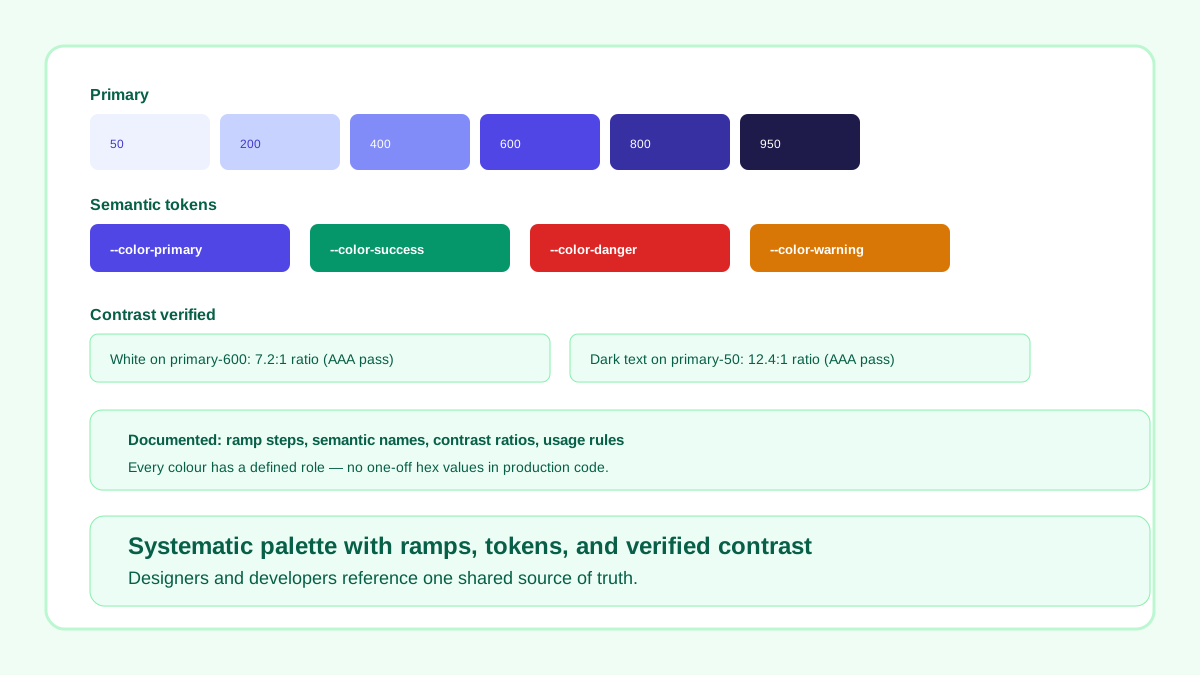
Consistent ramp, semantic token names, verified contrast ratios, and documented usage rules.
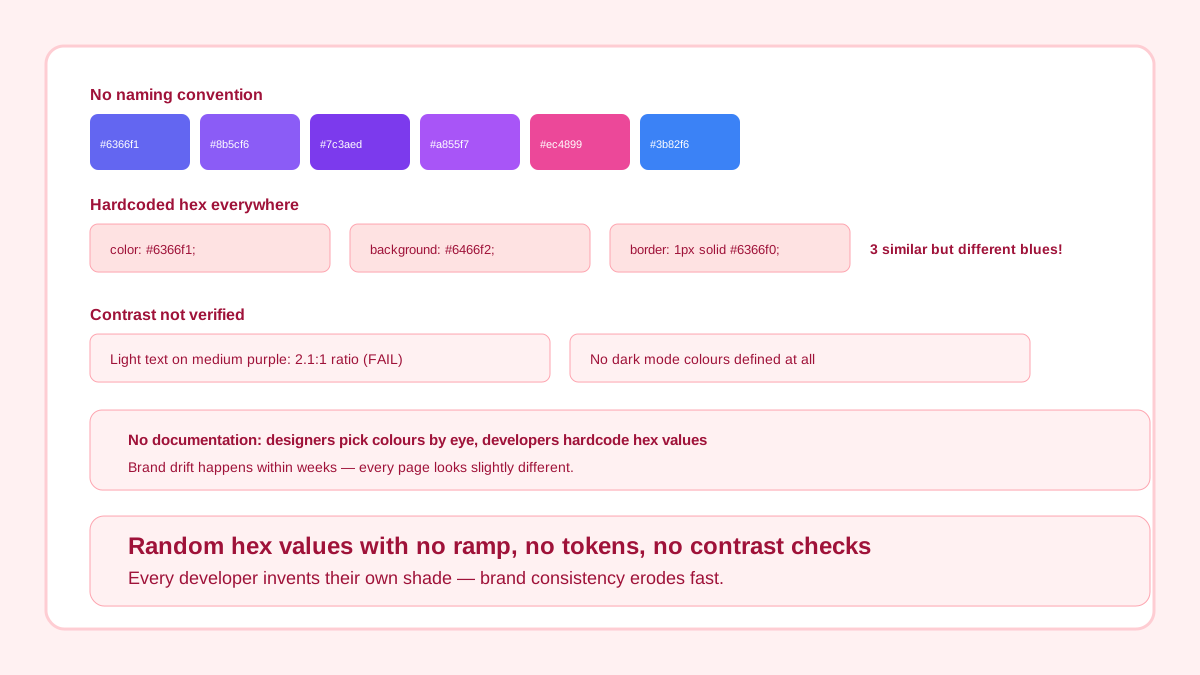
Unstructured hex collection with no naming, no contrast checks, and no dark mode support.
This is where a palette system proves itself. The same tokens should hold up across primary action, secondary surface, quiet text, and success feedback without ad-hoc hex overrides.
State board
Product update
Primary text, supporting text, and action colors all come from semantic tokens rather than one-off choices.
Saved successfully
Status tokens should work without inventing an isolated campaign-only green.
Related workflow
Explore related tools to keep your workflow fast and consistent.
