Gradient production guardrails
- OK Legibility zone
- OK Stop tuning
- OK Banding check
Practical Guide
Design gradients that stay readable, performant, and visually consistent across real devices.
Gradient production guardrails
Quick summary
Design gradients that stay readable, performant, and visually consistent across real devices.
Changelog: content updated 2026-03-01, references verified 2026-02-24.
Field Note
Great gradients prioritize readability and consistency first, then visual style enhancements.
Keep copy zones in lower-contrast areas and use overlays to preserve text clarity.
Use restrained gradient ranges so cards and controls remain legible.
Test banding and color shifts on multiple screen classes before release.
Pre-publish QA questions
Performance Deep Dive
Image budget defaults, CWV-ready workflows, and regression prevention checks.
| Use case | Setting | Baseline | Target |
|---|---|---|---|
| LCP hero image | Preloaded, right-sized, compressed | Explicit dimensions in markup | Lower LCP and stable render |
| Feed and gallery assets | Responsive variants + lazy loading offscreen | Max payload thresholds by template | Lower transfer and smoother scroll |
| Search-discovery image set | Canonical URL and metadata hygiene | Sitemap + alt text quality checks | Higher indexable image coverage |
Before
Oversized hero media, missing dimensions, and inconsistent delivery patterns.
After
Template-level image budgets and standardized loading/fallback behavior.
Typical outcome
More stable CWV metrics and measurable reduction in image-related regressions.
| Issue | Cause | Fix |
|---|---|---|
| LCP does not improve after compression | Hero still oversized or incorrectly prioritized | Rework hero dimensions and loading priority path first. |
| CLS worsens after redesign | Missing reserved image space | Enforce width/height or aspect-ratio placeholders in components. |
| Indexing gains are weak | Discovery workflow missing sitemap/alt coverage | Connect optimization with crawl and metadata processes. |
.hero-gradient { background: linear-gradient(135deg, var(--brand-700), var(--brand-500)); }
.hero-overlay { background: linear-gradient(0deg, rgba(0,0,0,.32), rgba(0,0,0,.08)); }Who this is for
What success looks like
Tested on
Scope and limits
Key takeaways
Common mistakes to avoid
30-minute action plan
Recommended tool stack
Related guides in this track
Shrink PNG files aggressively while preserving transparency, sharp edges, and brand quality.
7 min read
Speed up WordPress pages with a practical compression workflow for uploads, themes, and media.
8 min read
Move LCP and CLS in the right direction with an image-first optimization sequence.
10 min read
Help search engines discover, crawl, and index important image assets more reliably.
9 min read
Execution depth
Fast Pass
15-20 min
Fix the highest-risk issue first and ship a validated minimum improvement.
Standard Rollout
45-60 min
Apply the full guide workflow with QA checks before publishing broadly.
Team Standardization
90+ min
Convert the workflow into reusable presets, checklists, and team operating rules.
| Troubleshooting Signal | Likely Cause | Recommended Fix |
|---|---|---|
| LCP remains high after compression | Hero image dimensions/loading strategy still suboptimal | Right-size hero assets and prioritize their delivery path. |
| CLS increases after image changes | Width/height or aspect ratio not reserved | Declare intrinsic dimensions and keep layout slots stable. |
| No SEO uplift after optimization | Discovery/indexing flow not updated | Align image sitemap, alt text, and crawlable delivery URLs. |
Post-publish KPI checks
Detailed implementation blueprint
Quantify where images are currently hurting speed and search visibility.
Done when: You have a prioritized target list with measurable baseline metrics.
Implement the smallest set of image changes that move key metrics quickly.
Done when: Critical templates show clear metric improvement in validation checks.
Bake optimizations into reusable components so gains persist.
Done when: New content inherits optimized image behavior by default.
Catch regressions early and keep improvements compounding.
Done when: Image performance remains within targets release after release.
Quality gate checklist
Advanced wins
Execution next step
Run a primary tool action, review one companion guide, then apply the rollout checklist.
Run these checks before shipping any gradient to production. Gradient bugs are subtle — they pass on your Retina display but break on real user devices.
Text contrast changes across the gradient. A white heading may pass WCAG against the dark stop but fail completely against the light end. Check contrast at every point where text actually sits.
Open the page on an 8-bit display or mid-tier Android phone. Subtle gradients that look smooth on your Mac will show visible colour steps on lower-quality screens. Add noise overlay if banding appears.
Swap to dark mode and confirm gradient stops actually change. Hardcoded light-mode gradient colours on a dark surface create jarring contrast or washed-out sections.
Gradients between complementary colours (e.g. blue to orange) produce a brown or grey midpoint. Use perceptual colour spaces (oklch) or add a third mid-stop to control the transition.
Stacking more than 2-3 gradient layers with transparency causes overdraw that can degrade rendering performance on mid-tier mobile GPUs. Keep layering minimal.
Gradient angle and spread look different at 375px vs 1440px. A gradient that fills a desktop hero gracefully may compress awkwardly on mobile, making the colour transition feel abrupt.
Copy-ready gradient patterns for common use cases.
.hero {
  /* Gradient + overlay for guaranteed text contrast */
  background:
    linear-gradient(to bottom, rgba(0,0,0,0.4), rgba(0,0,0,0.6)),
    linear-gradient(135deg, #667eea 0%, #764ba2 100%);
  color: #fff;
}:root {
--gradient-start: #e0e7ff; /* indigo-100 */
--gradient-end: #c7d2fe; /* indigo-200 */
}
@media (prefers-color-scheme: dark) {
:root {
--gradient-start: #1e1b4b; /* indigo-950 */
--gradient-end: #312e81; /* indigo-900 */
}
}
.surface {
background: linear-gradient(135deg,
var(--gradient-start), var(--gradient-end));
}/* Add subtle noise to break up banding on low-quality displays */
.gradient-no-band {
background:
url("data:image/svg+xml,%3Csvg viewBox='0 0 200 200' xmlns='http://www.w3.org/2000/svg'%3E%3Cfilter id='n'%3E%3CfeTurbulence type='fractalNoise' baseFrequency='0.65' stitchTiles='stitch'/%3E%3C/filter%3E%3Crect width='100%25' height='100%25' filter='url(%23n)' opacity='0.05'/%3E%3C/svg%3E"),
linear-gradient(to bottom, #f0f4ff, #dbeafe);
}A quick visual aid for reviewing whether noise overlay is helping hide gradient banding.
Pick the right technique before writing any CSS — the wrong choice creates maintenance or accessibility debt.
If
Hero or banner background with text overlay
Then
Use gradient + semi-transparent overlay
The overlay guarantees text contrast regardless of gradient variation. Test contrast at every text position, not just extremes.
If
Decorative accent (no text on top)
Then
Simple linear or radial gradient
Keep it to 2-3 stops max. No overlay needed, but still test for banding on mobile screens.
If
Theme-adaptive surface (light + dark mode)
Then
Tokenised gradient with CSS custom properties
Store stop colors as variables so gradients swap cleanly when the theme changes.
If
Complex multi-color transition
Then
Use oklch color space with explicit mid-stops
oklch prevents the muddy brown/grey midpoint that happens when complementary colors blend in sRGB.
Modern color spaces like oklch produce better gradients but need fallbacks for older browsers.
.hero {
  /* sRGB fallback — every browser understands this */
  background: linear-gradient(135deg, #667eea, #764ba2);
  /* oklch upgrade — smoother perceptual transition */
  background: linear-gradient(in oklch 135deg,
    oklch(0.55 0.2 265), oklch(0.45 0.25 310));
}
Browsers that don't support oklch ignore the second declaration and use the sRGB version above it.
.card {
  /* Safe baseline */
  background: linear-gradient(to bottom, #e0e7ff, #c7d2fe);
}
@supports (background: linear-gradient(in oklch, red, blue)) {
  .card {
    background: linear-gradient(in oklch to bottom,
      oklch(0.92 0.03 270), oklch(0.85 0.06 275));
  }
}
Use @supports when the modern version changes enough properties that simple cascade override isn't clean.
Follow this sequence to ship gradients that look great, stay accessible, and adapt to dark mode.
Choose harmonious stop colors and positions using perceptual color spaces to avoid muddy midpoints.
If text sits on the gradient, verify contrast at every point where text appears — not just the extremes.
Preview on mobile screens and 8-bit displays where color banding is most visible.
Store stop colors as CSS custom properties so gradients adapt cleanly to theme switches.
Tokenised, tested gradients prevent banding artifacts and accessibility regressions across themes.
Compare a well-tested gradient against common failures that affect readability and appearance.
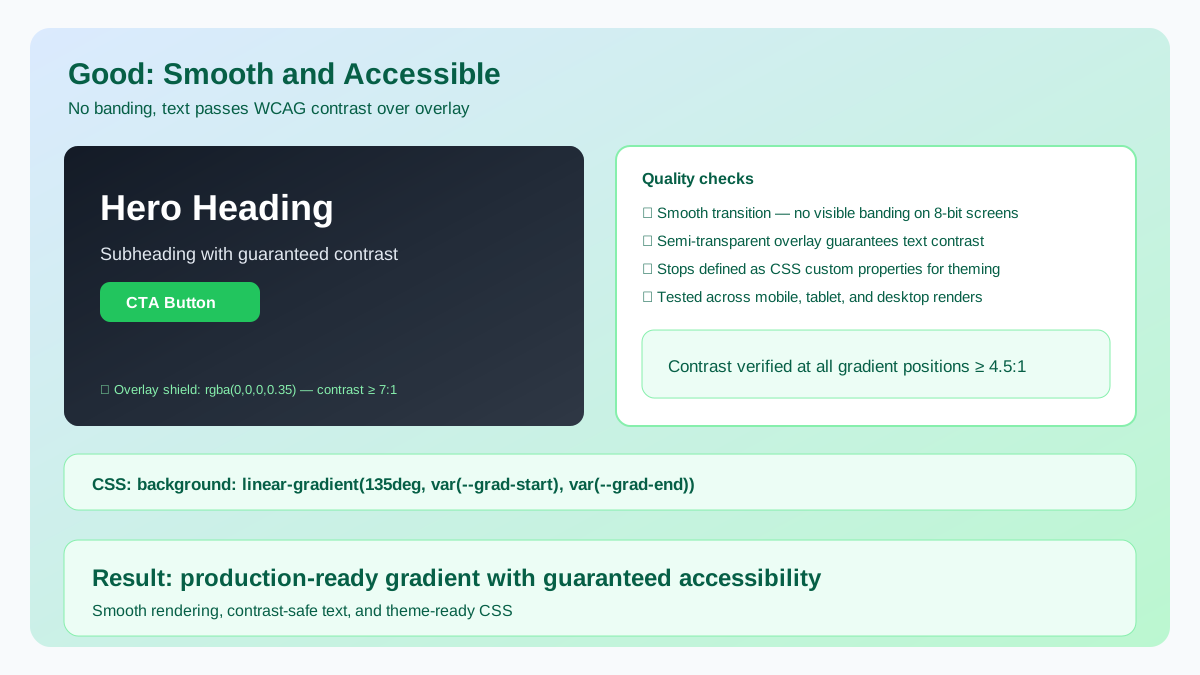
Smooth transition with no banding — text passes WCAG contrast over a semi-transparent overlay.
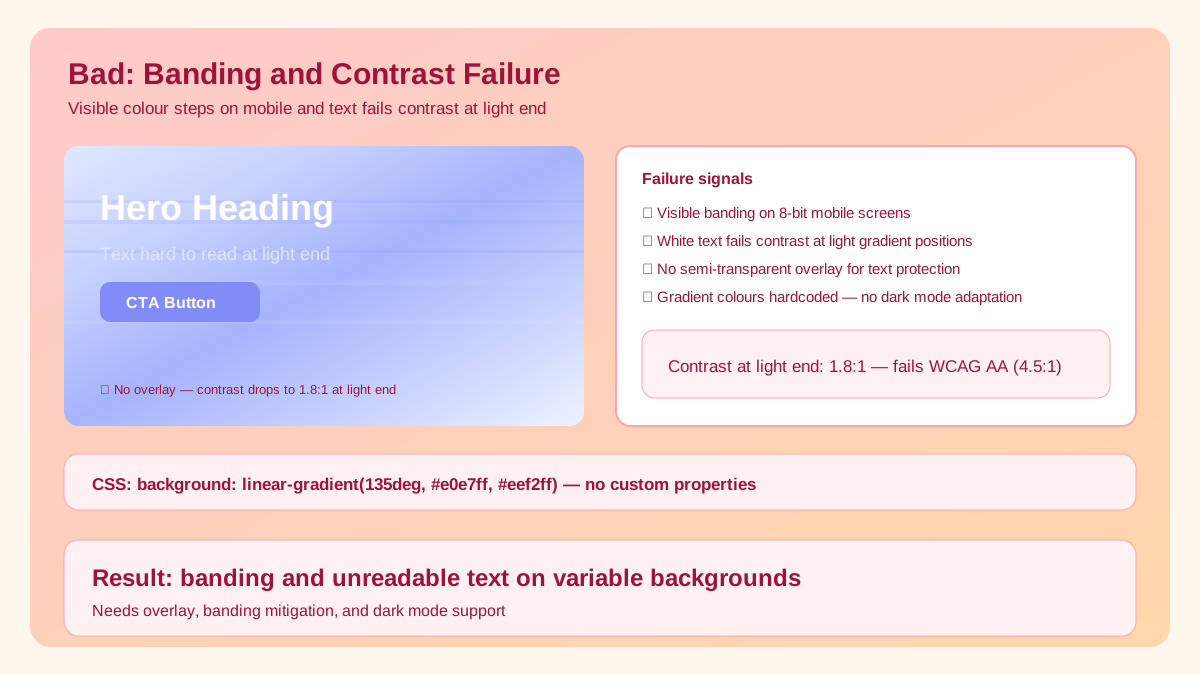
Visible colour banding on mobile screens and text fails contrast at the light end.
Related workflow
Explore related tools to keep your workflow fast and consistent.
