Core Web Vitals image workflow
1
Audit LCP pages
2
Optimize hero media
3
Watch field metrics
Practical Guide
Move LCP and CLS in the right direction with an image-first optimization sequence.
Core Web Vitals image workflow
1
Audit LCP pages
2
Optimize hero media
3
Watch field metrics
Quick summary
Move LCP and CLS in the right direction with an image-first optimization sequence.
Changelog: content updated 2026-02-24, references verified 2026-02-24.
Field Note
Treat images as first-class performance architecture: prioritize LCP candidates, reserve layout space, and continuously monitor regressions.
Reduce hero payload, preload correctly, and eliminate blocking dependencies in critical render path.
Enforce width/height or aspect-ratio reservations for every above-the-fold image component.
Track real-user metrics by template and correlate regressions to image pipeline changes.
Pre-publish QA questions
Performance Deep Dive
Image budget defaults, CWV-ready workflows, and regression prevention checks.
| Use case | Setting | Baseline | Target |
|---|---|---|---|
| LCP hero image | Preloaded, right-sized, compressed | Explicit dimensions in markup | Lower LCP and stable render |
| Feed and gallery assets | Responsive variants + lazy loading offscreen | Max payload thresholds by template | Lower transfer and smoother scroll |
| Search-discovery image set | Canonical URL and metadata hygiene | Sitemap + alt text quality checks | Higher indexable image coverage |
Before
Oversized hero media, missing dimensions, and inconsistent delivery patterns.
After
Template-level image budgets and standardized loading/fallback behavior.
Typical outcome
More stable CWV metrics and measurable reduction in image-related regressions.
| Issue | Cause | Fix |
|---|---|---|
| LCP does not improve after compression | Hero still oversized or incorrectly prioritized | Rework hero dimensions and loading priority path first. |
| CLS worsens after redesign | Missing reserved image space | Enforce width/height or aspect-ratio placeholders in components. |
| Indexing gains are weak | Discovery workflow missing sitemap/alt coverage | Connect optimization with crawl and metadata processes. |
| Signal | Weight | Scoring Guidance |
|---|---|---|
| Traffic share | High | Prioritize high-visit templates first |
| Revenue/conversion impact | High | Elevate templates tied to core journeys |
| Current CWV risk | Medium | Prioritize pages with largest metric gaps |
Who this is for
What success looks like
Tested on
Scope and limits
Key takeaways
Common mistakes to avoid
30-minute action plan
Recommended tool stack
Related guides in this track
Shrink PNG files aggressively while preserving transparency, sharp edges, and brand quality.
7 min read
Speed up WordPress pages with a practical compression workflow for uploads, themes, and media.
8 min read
Help search engines discover, crawl, and index important image assets more reliably.
9 min read
Write alt text that is genuinely useful for accessibility while still supporting search context.
6 min read
Execution depth
Fast Pass
15-20 min
Fix the highest-risk issue first and ship a validated minimum improvement.
Standard Rollout
45-60 min
Apply the full guide workflow with QA checks before publishing broadly.
Team Standardization
90+ min
Convert the workflow into reusable presets, checklists, and team operating rules.
| Troubleshooting Signal | Likely Cause | Recommended Fix |
|---|---|---|
| LCP remains high after compression | Hero image dimensions/loading strategy still suboptimal | Right-size hero assets and prioritize their delivery path. |
| CLS increases after image changes | Width/height or aspect ratio not reserved | Declare intrinsic dimensions and keep layout slots stable. |
| No SEO uplift after optimization | Discovery/indexing flow not updated | Align image sitemap, alt text, and crawlable delivery URLs. |
Post-publish KPI checks
Detailed implementation blueprint
Quantify where images are currently hurting speed and search visibility.
Done when: You have a prioritized target list with measurable baseline metrics.
Implement the smallest set of image changes that move key metrics quickly.
Done when: Critical templates show clear metric improvement in validation checks.
Bake optimizations into reusable components so gains persist.
Done when: New content inherits optimized image behavior by default.
Catch regressions early and keep improvements compounding.
Done when: Image performance remains within targets release after release.
Quality gate checklist
Advanced wins
Execution next step
Run a primary tool action, review one companion guide, then apply the rollout checklist.
Follow the same order each release to avoid scattered low-impact changes.
Use PSI or DevTools to identify the true largest-content image per template.
Resize and compress before trying secondary tuning tweaks.
Reserve layout space with width/height or aspect-ratio.
Track LCP and CLS in production over a full reporting window.
Identify the failing metric first, then apply the targeted image fix.
If
LCP is too slow (> 2.5s)
Then
Compress and right-size your hero image
The LCP image is usually a hero or banner — reduce its bytes first for the biggest single improvement.
If
CLS shifts visible on load
Then
Add width and height attributes to all images
Missing intrinsic dimensions cause layout jumps — aspect-ratio or explicit sizing reserves the space.
If
INP feels sluggish during scroll
Then
Lazy-load offscreen images and reduce decode cost
Large images decoded on the main thread block interaction — defer non-critical assets.
If
All metrics borderline but not passing
Then
Switch to WebP/AVIF and add srcset
Next-gen formats plus responsive sizing often push borderline scores into the green zone.
Use these as practical guardrails. The strongest wins usually come from the top 3 LCP candidate templates first, then sitewide standardization.
| Metric | Image Risk | Fix |
|---|---|---|
| LCP | Oversized hero image bytes | Compress and right-size hero images. |
| CLS | Missing intrinsic dimensions | Set width/height attributes or aspect ratio boxes. |
| INP | Main thread pressure from large decode | Optimize image payload and defer offscreen assets. |
Starting budgets for most marketing and ecommerce stacks (review against your own template constraints).
| Image Role | Target Width | Payload Budget | Recommended Format |
|---|---|---|---|
| Hero/LCP image | 1200-1920 px | 120-220 KB | AVIF/WebP (+ JPG fallback) |
| Article/content image | 800-1200 px | 70-160 KB | WebP or optimized JPG |
| Product grid thumb | 600-1000 px | 40-120 KB | WebP/JPG |
| Decorative icon/graphic | Exact render size x2 | Under 50 KB | SVG or PNG |
Guide Visual
This is the single highest-value image pattern to fix first: the above-the-fold hero that delays its own request and shifts the layout after it arrives.
Markup Diff
Bad
<img
  src="/hero-1900.jpg"
  loading="lazy"
  alt="Summer collection hero">
Delayed request, oversized bytes, and no reserved layout space.
Fixed
<img
  src="/hero-1440.webp"
  width="1440"
  height="810"
  fetchpriority="high"
  alt="Summer collection hero">
Requests early, paints a right-sized file, and keeps the layout stable.
What the Browser Experiences
Unoptimized hero path
Late LCPOptimized hero path
Faster paintTakeaway 1
Do not lazy-load the LCP image. Let it request immediately and add `fetchpriority="high"` when it is clearly the hero.
Takeaway 2
Reserve layout space with width/height so content does not jump when the hero finally arrives.
Takeaway 3
The fastest wins usually come from one fixed hero pattern repeated across your top templates.
Start with the homepage or highest-traffic landing template, fix the hero request path there, then roll the same component standard across the rest of the site.
Guide Visual
Do not spread effort evenly across every page type. Fix the templates where image changes can move field data fastest, then standardize the pattern once it works.
Homepage / top landing pages
Usually contain the true LCP hero and the most visible field-data regressions.
Article / content templates
Good place to standardize width, height, and responsive image defaults after the hero pattern is proven.
Product grids / listings
Usually less dramatic for LCP than heroes, but valuable for total byte savings and smoother scrolling.
Rule of thumb
Fix the top traffic templates where images dominate LCP first, then roll the winning component pattern into content and listing templates instead of tuning every page in isolation.
Step 1
Resize source assets to realistic display dimensions.
Step 2
Compress with Image Compressor.
Step 3
Use WebP/AVIF for primary delivery where compatible.
Step 4
Declare image dimensions in markup to prevent layout shifts.
This illustrates the difference one high-impact image can make.
The same page with optimised vs unoptimised images can mean the difference between green and red CWV scores.
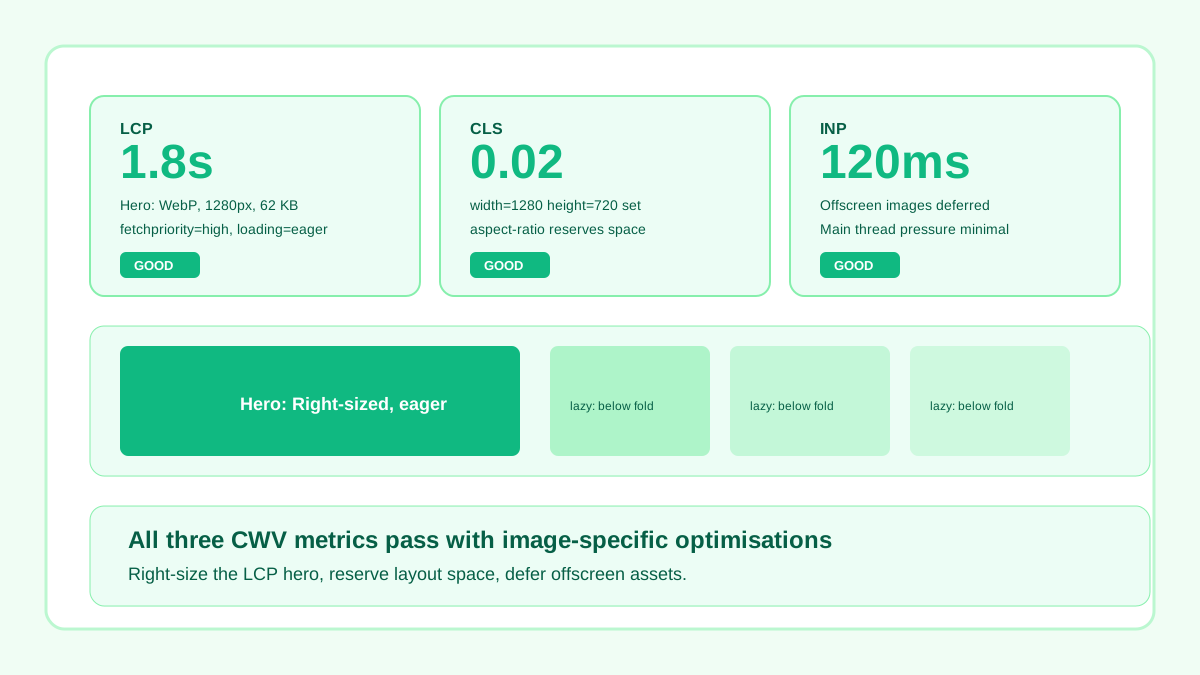
Right-sized hero, width/height attributes set, offscreen images deferred — all CWV pass.
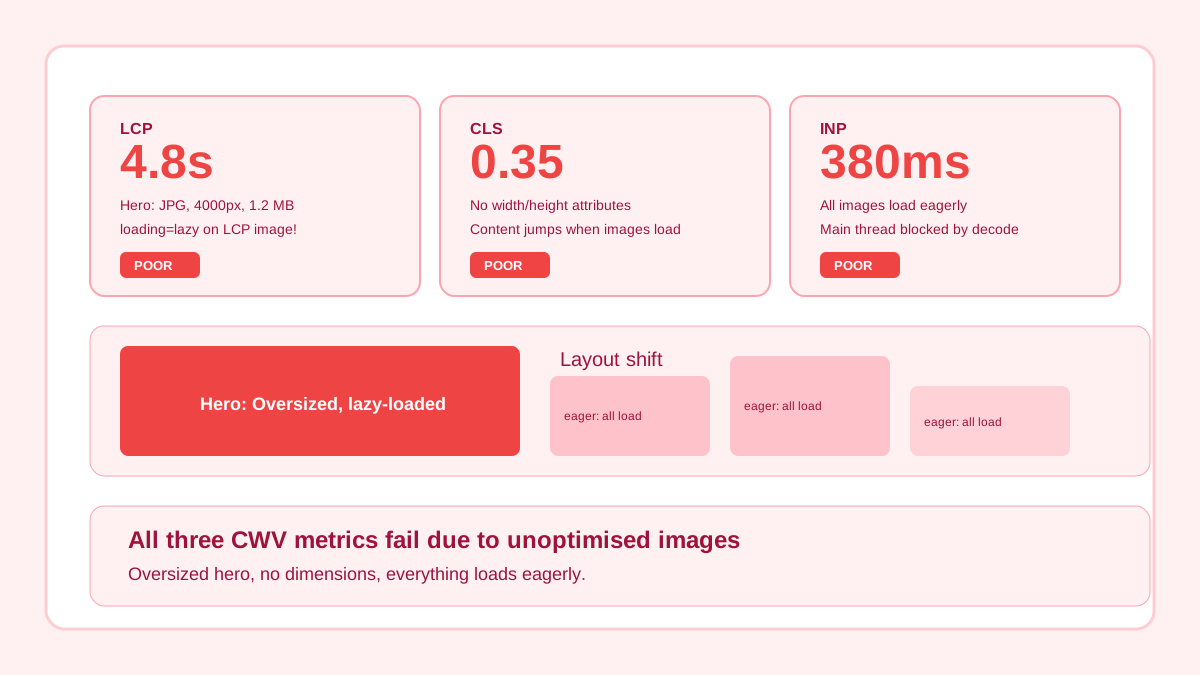
Oversized hero, no dimensions, lazy-loaded LCP image, everything loads eagerly.
Related workflow
Explore related tools to keep your workflow fast and consistent.
