Responsive image markup pattern
1
Build variants
2
Set sizes
3
Verify candidates
Practical Guide
Implement responsive image markup correctly so each device downloads the right file size without harming quality.
Responsive image markup pattern
1
Build variants
2
Set sizes
3
Verify candidates
Quick summary
Implement responsive image markup correctly so each device downloads the right file size without harming quality.
Changelog: content updated 2026-03-06, references verified 2026-02-24.
Field Note
Responsive images succeed when art direction, size hints, and file variants are coordinated as one delivery policy.
Define predictable breakpoints and corresponding width sets for reusable components.
Use precise sizes attributes so mobile users do not download desktop-weight assets.
Combine srcset with preload/fetchpriority for the true LCP candidate image.
Pre-publish QA questions
Performance Deep Dive
Image budget defaults, CWV-ready workflows, and regression prevention checks.
| Use case | Setting | Baseline | Target |
|---|---|---|---|
| LCP hero image | Preloaded, right-sized, compressed | Explicit dimensions in markup | Lower LCP and stable render |
| Feed and gallery assets | Responsive variants + lazy loading offscreen | Max payload thresholds by template | Lower transfer and smoother scroll |
| Search-discovery image set | Canonical URL and metadata hygiene | Sitemap + alt text quality checks | Higher indexable image coverage |
Before
Oversized hero media, missing dimensions, and inconsistent delivery patterns.
After
Template-level image budgets and standardized loading/fallback behavior.
Typical outcome
More stable CWV metrics and measurable reduction in image-related regressions.
| Issue | Cause | Fix |
|---|---|---|
| LCP does not improve after compression | Hero still oversized or incorrectly prioritized | Rework hero dimensions and loading priority path first. |
| CLS worsens after redesign | Missing reserved image space | Enforce width/height or aspect-ratio placeholders in components. |
| Indexing gains are weak | Discovery workflow missing sitemap/alt coverage | Connect optimization with crawl and metadata processes. |
Who this is for
What success looks like
Tested on
Scope and limits
Key takeaways
Common mistakes to avoid
30-minute action plan
Recommended tool stack
Related guides in this track
Shrink PNG files aggressively while preserving transparency, sharp edges, and brand quality.
7 min read
Speed up WordPress pages with a practical compression workflow for uploads, themes, and media.
8 min read
Move LCP and CLS in the right direction with an image-first optimization sequence.
10 min read
Help search engines discover, crawl, and index important image assets more reliably.
9 min read
Execution depth
Fast Pass
15-20 min
Fix the highest-risk issue first and ship a validated minimum improvement.
Standard Rollout
45-60 min
Apply the full guide workflow with QA checks before publishing broadly.
Team Standardization
90+ min
Convert the workflow into reusable presets, checklists, and team operating rules.
| Troubleshooting Signal | Likely Cause | Recommended Fix |
|---|---|---|
| LCP remains high after compression | Hero image dimensions/loading strategy still suboptimal | Right-size hero assets and prioritize their delivery path. |
| CLS increases after image changes | Width/height or aspect ratio not reserved | Declare intrinsic dimensions and keep layout slots stable. |
| No SEO uplift after optimization | Discovery/indexing flow not updated | Align image sitemap, alt text, and crawlable delivery URLs. |
Post-publish KPI checks
Detailed implementation blueprint
Quantify where images are currently hurting speed and search visibility.
Done when: You have a prioritized target list with measurable baseline metrics.
Implement the smallest set of image changes that move key metrics quickly.
Done when: Critical templates show clear metric improvement in validation checks.
Bake optimizations into reusable components so gains persist.
Done when: New content inherits optimized image behavior by default.
Catch regressions early and keep improvements compounding.
Done when: Image performance remains within targets release after release.
Quality gate checklist
Advanced wins
Execution next step
Run a primary tool action, review one companion guide, then apply the rollout checklist.
Quick visual path for choosing the right responsive implementation.
Inspect real rendered widths across mobile, tablet, and desktop templates.
Export 3-5 practical widths instead of many near-duplicates.
Map candidate widths to realistic layout slot behavior.
Confirm fetched width is close to rendered width x DPR.
Good baseline for content images that render around 90vw on mobile and 50vw on desktop.
<img
  src="/images/example-1200.jpg"
  srcset="
    /images/example-480.jpg 480w,
    /images/example-768.jpg 768w,
    /images/example-1200.jpg 1200w,
    /images/example-1600.jpg 1600w"
  sizes="(max-width: 768px) 92vw, (max-width: 1200px) 70vw, 50vw"
  width="1200"
  height="800"
  alt="Product detail image"
  loading="lazy"
  decoding="async" />
Use <picture> when mobile and desktop need different crops, not just different file sizes.
<picture>
  <source media="(max-width: 767px)" srcset="/images/hero-mobile-900.webp" />
  <source media="(min-width: 768px)" srcset="/images/hero-desktop-1600.webp" />
  <img src="/images/hero-desktop-1600.webp" width="1600" height="900" alt="Hero image" />
</picture>
Keep crops intentionally different by viewport, but still define intrinsic dimensions to prevent CLS.
This is the decision point that trips teams up most often.
If
Only file width changes
Then
Use img + srcset + sizes
Same crop, same content, just different candidate widths.
If
Crop or composition changes
Then
Use picture
Art direction belongs in source selection, not in a single srcset list.
If
The image is decorative only
Then
Consider CSS background/image-set
Keep content images in HTML; decorative assets can stay in CSS.
If
You are unsure of the slot width
Then
Measure the component first
Incorrect sizes hints create waste even when the srcset list looks fine.
Layout: full width up to 1200px. Use fewer large variants, prioritize quality.
(max-width: 1280px) 100vw, 1280pxLayout: 2-up mobile, 4-up desktop. Keep candidate widths tight to avoid waste.
(max-width: 640px) 48vw, (max-width: 1200px) 24vw, 280px100vw everywhere: browser downloads oversized assets in constrained containers.The main win is reducing wasted bytes while preserving image sharpness.
The entire point of srcset is to let each device download only the bytes it actually needs.
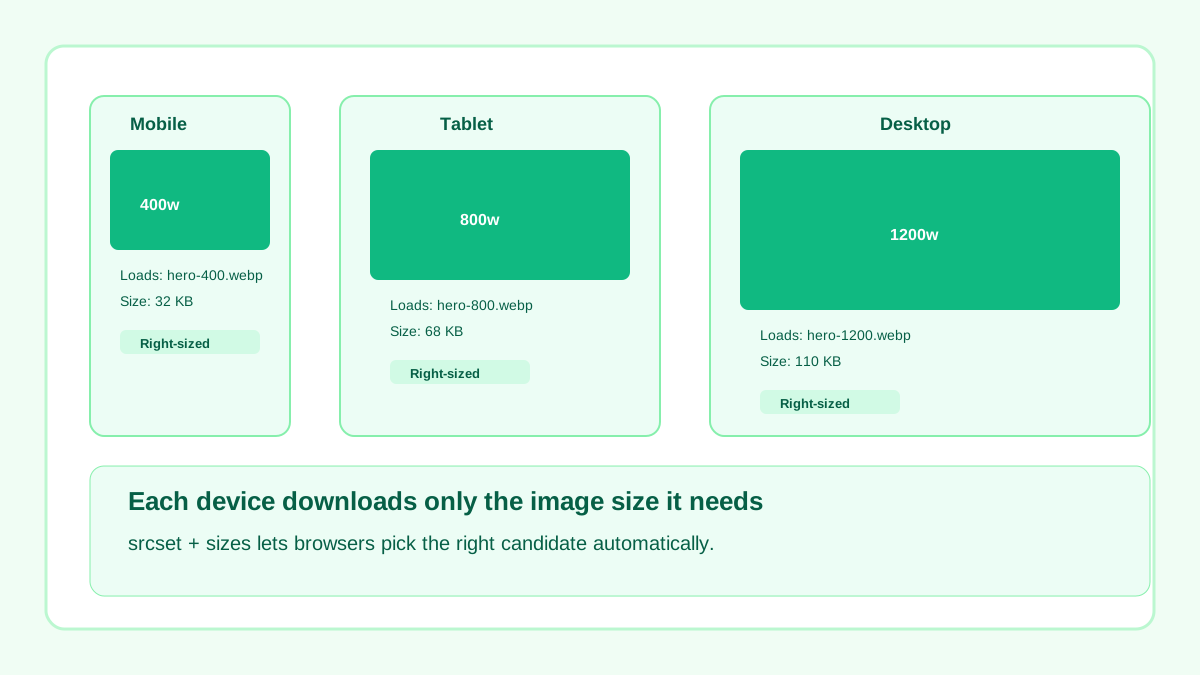
Each viewport downloads a candidate matched to its real display size.
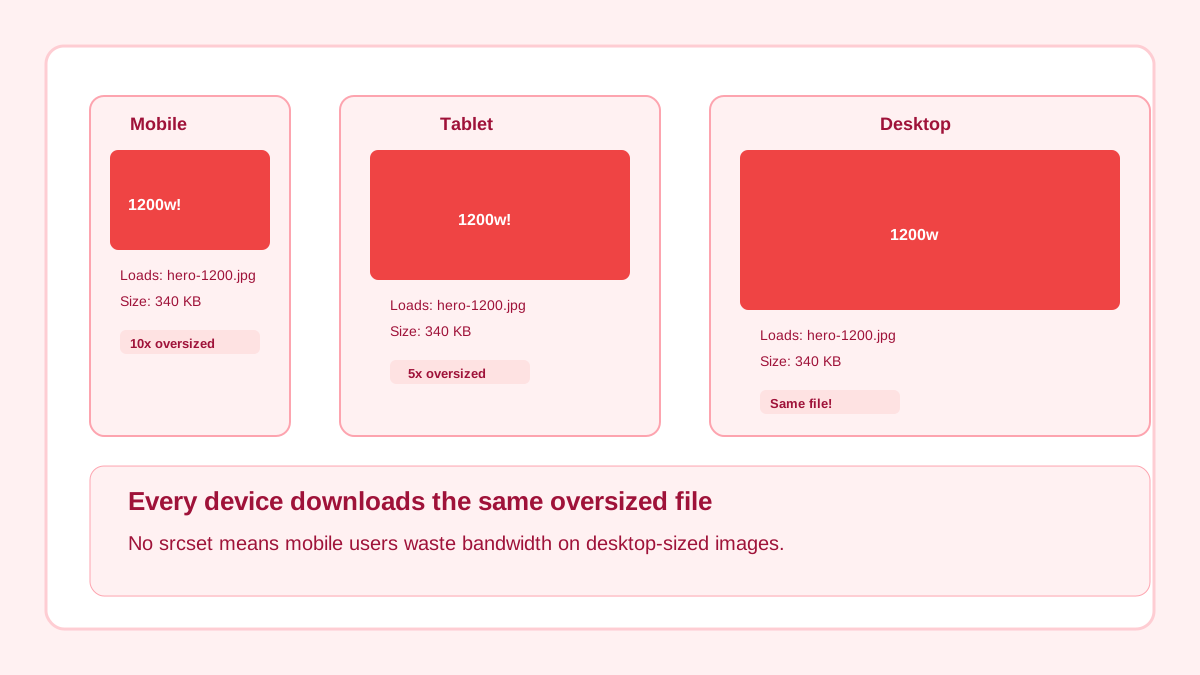
Every device downloads the same desktop-sized file, wasting bandwidth on mobile.
Guide Visual
This is the mental model most teams are missing when `srcset` looks correct but still downloads the wrong file.
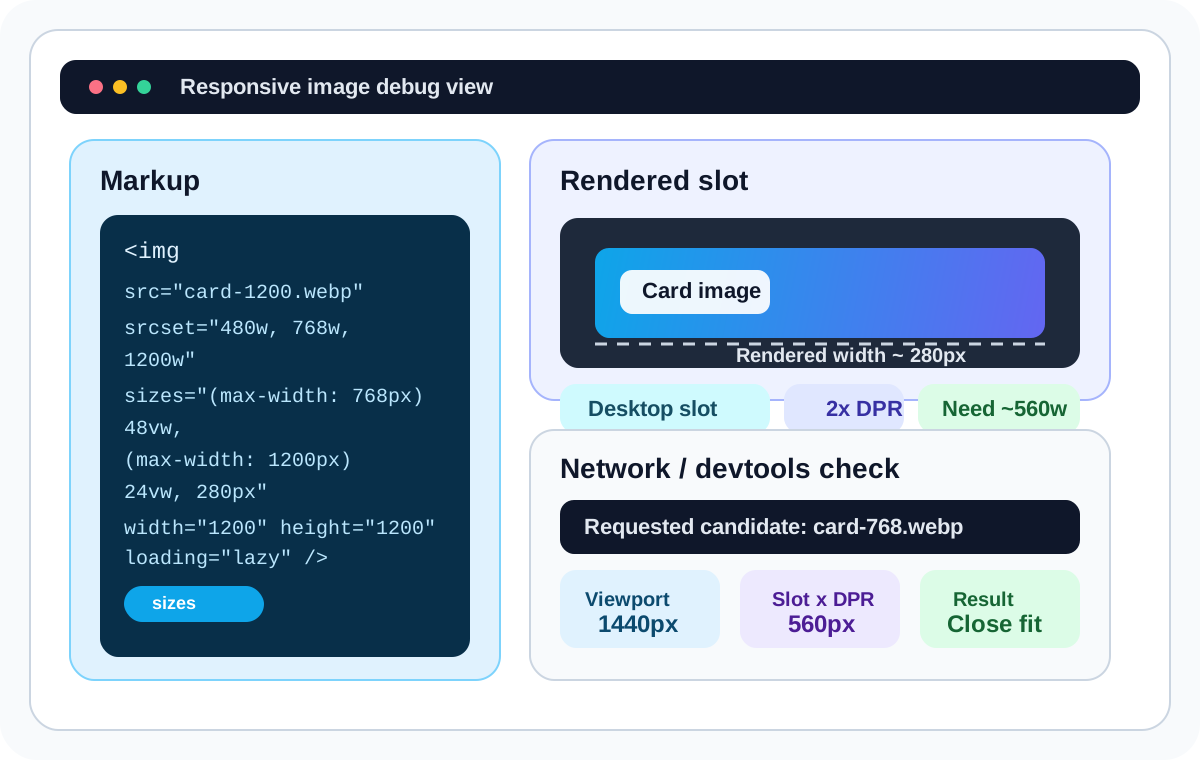
When responsive delivery feels off, use this order so you debug the real problem instead of guessing at candidate widths.
Step 1
Measure the rendered slot width in devtools, not the overall viewport width.
Step 2
Multiply that slot width by device pixel ratio to estimate the candidate the browser should prefer.
Step 3
Check which sizes condition matched first. Most waste comes from this line being dishonest.
Step 4
Only after that should you adjust candidate widths or add a missing source in <picture>.
Related workflow
Explore related tools to keep your workflow fast and consistent.
Keep moving
Create clean width variants for srcset candidates.
Open tool
Keep moving
Reduce payload after generating variants.
Open tool
Keep moving
Combine responsive markup with smart loading policy.
Open tool
Keep moving
Apply responsive images inside broader CWV strategy.
Open tool
