Image indexing diagnostics workflow
1
Check crawlability
2
Validate signals
3
Request recrawl
Practical Guide
Diagnose why images are not indexing with a practical checklist spanning crawlability, markup, rendering, and quality signals.
Image indexing diagnostics workflow
1
Check crawlability
2
Validate signals
3
Request recrawl
Quick summary
Diagnose why images are not indexing with a practical checklist spanning crawlability, markup, rendering, and quality signals.
Changelog: content updated 2026-03-06, references verified 2026-02-24.
Field Note
Image indexing problems are usually systems problems: crawlability, canonicalization, rendering, and quality all need to align.
Audit image URL status, robots directives, and canonical image references first.
Map old vs new image URLs and resolve redirect chains or blocked variants.
Ensure important images remain discoverable in rendered HTML and sitemap signals.
Pre-publish QA questions
Performance Deep Dive
Image budget defaults, CWV-ready workflows, and regression prevention checks.
| Use case | Setting | Baseline | Target |
|---|---|---|---|
| LCP hero image | Preloaded, right-sized, compressed | Explicit dimensions in markup | Lower LCP and stable render |
| Feed and gallery assets | Responsive variants + lazy loading offscreen | Max payload thresholds by template | Lower transfer and smoother scroll |
| Search-discovery image set | Canonical URL and metadata hygiene | Sitemap + alt text quality checks | Higher indexable image coverage |
Before
Oversized hero media, missing dimensions, and inconsistent delivery patterns.
After
Template-level image budgets and standardized loading/fallback behavior.
Typical outcome
More stable CWV metrics and measurable reduction in image-related regressions.
| Issue | Cause | Fix |
|---|---|---|
| LCP does not improve after compression | Hero still oversized or incorrectly prioritized | Rework hero dimensions and loading priority path first. |
| CLS worsens after redesign | Missing reserved image space | Enforce width/height or aspect-ratio placeholders in components. |
| Indexing gains are weak | Discovery workflow missing sitemap/alt coverage | Connect optimization with crawl and metadata processes. |
Who this is for
What success looks like
Tested on
Scope and limits
Key takeaways
Common mistakes to avoid
30-minute action plan
Recommended tool stack
Related guides in this track
Shrink PNG files aggressively while preserving transparency, sharp edges, and brand quality.
7 min read
Speed up WordPress pages with a practical compression workflow for uploads, themes, and media.
8 min read
Move LCP and CLS in the right direction with an image-first optimization sequence.
10 min read
Help search engines discover, crawl, and index important image assets more reliably.
9 min read
Execution depth
Fast Pass
15-20 min
Fix the highest-risk issue first and ship a validated minimum improvement.
Standard Rollout
45-60 min
Apply the full guide workflow with QA checks before publishing broadly.
Team Standardization
90+ min
Convert the workflow into reusable presets, checklists, and team operating rules.
| Troubleshooting Signal | Likely Cause | Recommended Fix |
|---|---|---|
| LCP remains high after compression | Hero image dimensions/loading strategy still suboptimal | Right-size hero assets and prioritize their delivery path. |
| CLS increases after image changes | Width/height or aspect ratio not reserved | Declare intrinsic dimensions and keep layout slots stable. |
| No SEO uplift after optimization | Discovery/indexing flow not updated | Align image sitemap, alt text, and crawlable delivery URLs. |
Post-publish KPI checks
Detailed implementation blueprint
Quantify where images are currently hurting speed and search visibility.
Done when: You have a prioritized target list with measurable baseline metrics.
Implement the smallest set of image changes that move key metrics quickly.
Done when: Critical templates show clear metric improvement in validation checks.
Bake optimizations into reusable components so gains persist.
Done when: New content inherits optimized image behavior by default.
Catch regressions early and keep improvements compounding.
Done when: Image performance remains within targets release after release.
Quality gate checklist
Advanced wins
Execution next step
Run a primary tool action, review one companion guide, then apply the rollout checklist.
Follow this visual order to fix root blockers before secondary quality tuning.
Confirm direct URL returns 200 with valid image MIME and no auth wall.
Verify robots rules and headers are not blocking image discovery.
Keep sitemap, markup, and canonical host consistent for the same image.
Inspect affected URLs and monitor recovery over recrawl cycles.
Guide Visual
Start here so you fix the highest-impact blocker first instead of chasing lower-value tweaks.
Case 1
Likely cause
Image URL is blocked, redirected, private, or unstable across discovery surfaces.
First fix
Confirm the direct image URL returns 200 and lives on a stable canonical host.
Case 2
Likely cause
Color, size, or faceted variants publish inconsistent canonical image signals.
First fix
Keep one primary indexable variant per page and align markup, JSON-LD, and sitemap output to it.
Case 3
Likely cause
Legacy image paths now 404, redirect poorly, or use expiring signed URLs.
First fix
Move indexable assets to permanent public URLs and 301 old media paths cleanly.
Case 4
Likely cause
Google sees weak page context, duplicate reuse, or a render-only discovery path.
First fix
Improve rendered visibility, descriptive alt text, and surrounding copy for the primary image.
When multiple symptoms are present, still start with direct URL health. Broken or unstable image targets undermine every other indexing signal.
200 and load without cookies/auth.Guide Visual
Recovery usually happens when these discovery signals converge on one stable, crawlable image URL.
Checks to align
Raw URL health
The image loads at a public URL with 200 status and valid image MIME type.
Rendered HTML visibility
Important images are present in the rendered DOM, not only after interaction.
Sitemap alignment
The image sitemap points to the same canonical public URL.
CDN stability
No expiring tokens, brittle redirects, or split canonical hosts.
Image Google can trust
Stable crawlable image URL
When the raw response, rendered page, sitemap entry, and CDN behavior all agree on the same image target, Google has a much cleaner path to fetch and index it.
Recovery signs
Fewer skipped images
Coverage gaps shrink once broken or unstable image targets are removed.
Cleaner Search Console checks
URL inspection and page fetches become easier to interpret.
Faster incident response
Teams can isolate whether the blocker is URL health, rendering, or signal drift.
If even one signal points to a different URL, Google has to reconcile conflicting image discovery inputs.
Validate HTTP behavior directly before changing templates. This catches redirect chains, auth walls, and content-type issues quickly.
curl -I https://img.example.com/path/image.webp

# Expected:
# HTTP/2 200
# content-type: image/webp
# cache-control: public, max-age=...
# (no x-robots-tag: noindex)
If image URLs return redirect chains or temporary signed URLs, fix that first before deeper SEO tuning.
Most indexing recoveries come from stabilizing URL and render signals, not from one-off metadata tweaks.
Start with the most common blocker and work down. Most teams fix the wrong layer first.
If
Non-200 status (404, 302, 403)
Then
Fix URL health first
Nothing else matters until the direct image URL returns a clean 200 with correct MIME type.
If
200 but blocked by robots.txt or noindex header
Then
Remove crawl/index blocks
Check both the image host and any CDN-level robots rules or X-Robots-Tag headers.
If
200 and crawlable, but not appearing in image search
Then
Check rendering and signal alignment
Ensure the image is in rendered DOM (not interaction-gated) and sitemap/markup point to the same URL.
If
Everything looks correct technically
Then
Strengthen page context and relevance
Google still evaluates image uniqueness, alt text quality, and surrounding page content before indexing.
Compare a healthy image configuration against common patterns that silently block indexing.
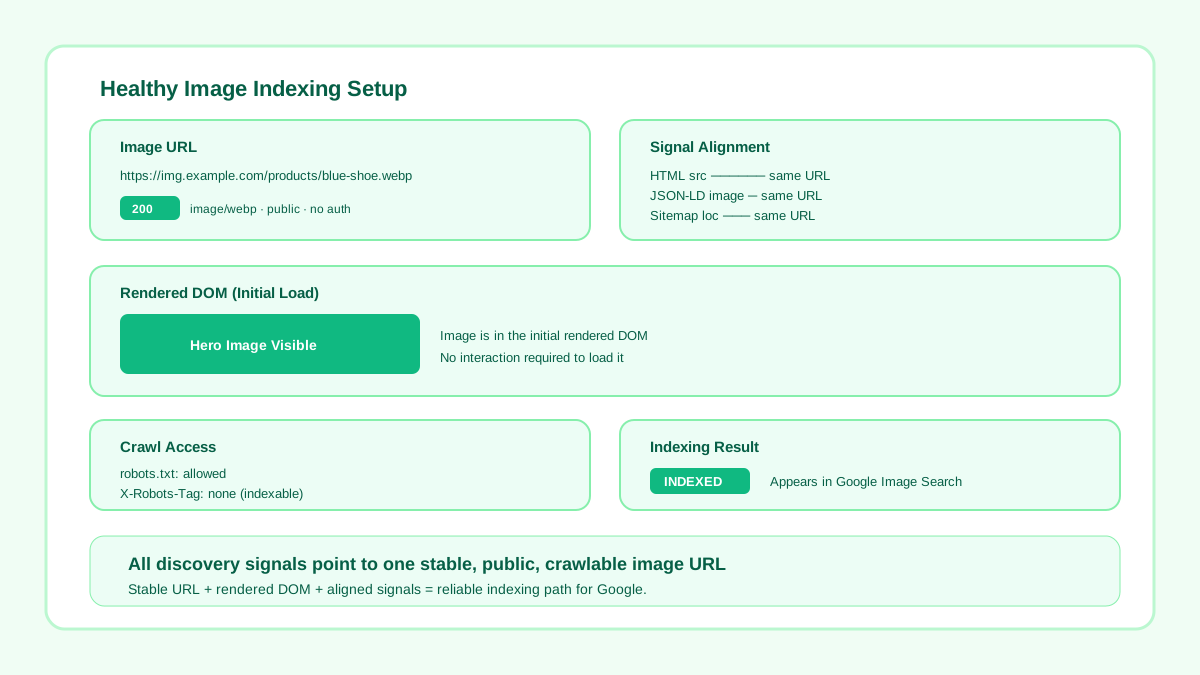
Stable public URL, present in rendered DOM, consistent across sitemap and markup.
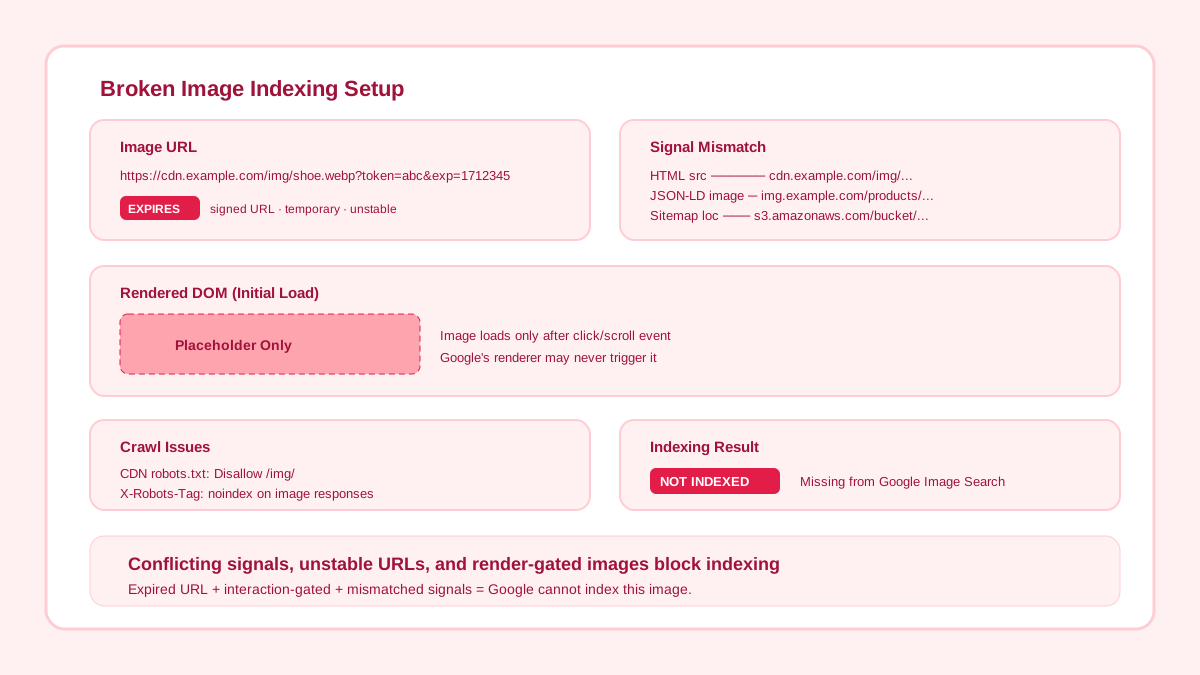
Signed URL expires, image loads only after JS interaction, sitemap points to a different host.
Use these GSC features to pinpoint exactly where the indexing pipeline breaks for your images.
Paste the parent page URL and check "Page resources" in the rendered view. If your image appears as "blocked" or "not loaded", Google cannot discover it on that page.
Filter by "Image" to see which image URLs are indexed vs excluded. "Crawled — currently not indexed" often means the image lacks context or relevance signals.
Check if your image sitemap was successfully processed. "Has errors" or "Couldn't fetch" statuses mean Google never saw your image entries at all.
Switch the search type to "Image" to see impressions and clicks for indexed images. A drop here after a migration confirms the timeline of the issue.
Related workflow
Explore related tools to keep your workflow fast and consistent.
Keep moving
Keep discovery signals consistent for important image URLs.
Open tool
Keep moving
Avoid canonical and cache patterns that break indexability.
Open tool
Keep moving
Inspect image-level details while debugging indexing quality signals.
Open tool
Keep moving
Pair indexing fixes with performance improvements.
Open tool
