Product image SEO operations flow
1
Standardize naming
2
Optimize variants
3
Monitor index
Practical Guide
Improve ecommerce image visibility with practical naming, alt text, variant, and faceted navigation rules.
Product image SEO operations flow
1
Standardize naming
2
Optimize variants
3
Monitor index
Quick summary
Improve ecommerce image visibility with practical naming, alt text, variant, and faceted navigation rules.
Changelog: content updated 2026-03-06, references verified 2026-02-24.
Field Note
Product image SEO scales when naming, variants, alt text, and faceted URL handling are standardized across catalog operations.
Enforce deterministic file naming and variant generation to keep index signals clean.
Control crawl paths and canonicalization so duplicate image contexts do not dilute signals.
Template-driven alt and metadata QA keeps quality high during rapid catalog updates.
Pre-publish QA questions
Channel Delivery Deep Dive
Storefront/social defaults, channel pitfalls, and share-safe implementation notes.
| Use case | Setting | Baseline | Target |
|---|---|---|---|
| Storefront catalog grid | Single ratio policy | 1000-1200 px long edge | Stable card layout and faster loads |
| Product detail imagery | Higher-detail variant + compression | 1600-2400 px long edge | Clear zoom without bloat |
| Social OG campaign art | 1200x630 with safe zones | Center-weighted composition | Consistent preview fidelity |
Before
Uneven ratios, over-sized exports, and repetitive channel-specific rework.
After
Preset-based resizing/compression with platform-safe crop rules.
Typical outcome
Cleaner storefronts and quicker campaign asset turnaround.
| Issue | Cause | Fix |
|---|---|---|
| Catalog cards look uneven | Mixed aspect ratios in source uploads | Apply one ratio standard per storefront template. |
| Social previews crop key message | No safe-zone composition | Use center-safe text/brand zones in OG templates. |
| Teams keep re-exporting manually | No reusable presets | Create named presets per channel and enforce them. |
Who this is for
What success looks like
Tested on
Scope and limits
Key takeaways
Common mistakes to avoid
30-minute action plan
Recommended tool stack
Related guides in this track
Use platform-safe Open Graph dimensions so social previews look clean and clickable.
6 min read
Audit live Open Graph and X metadata, debug broken social previews, and fix the highest-impact issues first.
9 min read
Prepare Shopify and WooCommerce images with consistent sizing, better quality, and faster load times.
8 min read
Turn one brand color into a production-ready palette with semantic tokens and accessibility checks.
9 min read
Execution depth
Fast Pass
15-20 min
Fix the highest-risk issue first and ship a validated minimum improvement.
Standard Rollout
45-60 min
Apply the full guide workflow with QA checks before publishing broadly.
Team Standardization
90+ min
Convert the workflow into reusable presets, checklists, and team operating rules.
| Troubleshooting Signal | Likely Cause | Recommended Fix |
|---|---|---|
| Product imagery looks inconsistent | Mixed dimensions and export settings | Standardize channel-specific presets and enforce them in workflow. |
| Social previews crop key content | Wrong canvas ratio or safe zone usage | Design with platform-safe dimensions and preview before posting. |
| Campaign assets take too long to ship | Manual one-off edits per channel | Use reusable templates plus batch resize/compress steps. |
Post-publish KPI checks
Detailed implementation blueprint
Map each destination channel to exact format, dimensions, and quality rules.
Done when: You have a complete destination spec sheet for all high-value channels.
Build reusable export presets to eliminate one-off manual edits.
Done when: Teams can generate channel-ready assets with minimal manual tweaking.
Add preflight checks that catch errors before campaigns go live.
Done when: First-publish success rate is high and preview errors are uncommon.
Operationalize the workflow for larger catalogs and faster campaign cycles.
Done when: Asset operations scale without quality drift or repeated rework.
Quality gate checklist
Advanced wins
Execution next step
Run a primary tool action, review one companion guide, then apply the rollout checklist.
Use this path to keep catalog image quality, crawl signals, and naming standards aligned.
Enforce SKU-first deterministic filenames at ingest.
Generate PLP, PDP, zoom, and social variants from one source.
Expose primary variants in sitemap and structured data arrays.
Reduce low-value filter combinations that duplicate image contexts.
Use deterministic naming so variants are easy to index, debug, and maintain.
good: /products/sku-5821/sku-5821-blue-front.webp
good: /products/sku-5821/sku-5821-blue-side.webp
bad: /uploads/IMG_10391-final-v3.webpDescribe image intent naturally; avoid keyword stuffing.
Keep one canonical variant for indexing, other variants for UX.
This is the alignment pattern teams usually miss: the same canonical hero image should show up in the filename, rendered HTML, product structured data, and image sitemap.
1. Filename
sku-5821-blue-front.webp
Stable, SKU-first, and angle-specific. This becomes the canonical discovery asset for the blue variant.
2. HTML
img.example.com/products/sku-5821/sku-5821-blue-front.webp
Use the same canonical URL in the PDP hero image, not a temporary transform or session-bound variant.
3. JSON-LD
"image"[0] = canonical hero
Keep the hero image first in the product image array, then list side/detail views in stable order.
4. Sitemap
<image:loc>same URL</image:loc>
Image discovery works best when the sitemap repeats the exact URL already used in markup and structured data.
Filename
/products/sku-5821/sku-5821-blue-front.webp

HTML
<img
  src="https://img.example.com/products/sku-5821/sku-5821-blue-front.webp"
  alt="Blue leather running shoe, front view"
  width="1200"
  height="1200">

JSON-LD
"image": [
  "https://img.example.com/products/sku-5821/sku-5821-blue-front.webp",
  "https://img.example.com/products/sku-5821/sku-5821-blue-side.webp"
]

Image sitemap
<url>
  <loc>https://www.example.com/products/trail-runner-2-blue</loc>
  <image:image>
    <image:loc>https://img.example.com/products/sku-5821/sku-5821-blue-front.webp</image:loc>
  </image:image>
</url>Guide Visual
This is the discovery path you want on every important product page: all image signals point to the same primary hero asset.
Signal sources
SKU filename standard
Predictable asset names make primary hero images easy to map and audit.
Rendered PDP hero
The first product image in HTML should use the same stable canonical URL.
Product JSON-LD
The hero image appears first in the Product image array.
Image sitemap entry
The sitemap repeats the same public image URL for discovery.
Canonical image target
https://img.example.com/products/sku-5821/sku-5821-blue-front.webp
One canonical hero image URL anchors the product page. Supporting side, detail, and lifestyle assets can still exist, but they do not replace this primary discovery target.
SEO outcomes
Cleaner indexing signals
Google sees one clear hero image per variant page instead of many drifting candidates.
Faster catalog debugging
Ops and engineering can trace one image URL through every discovery surface.
Better variant governance
Supporting images stay useful for UX without competing for the canonical slot.
If one of these sources points at a transformed or temporary URL, the whole catalog signal gets noisier.
This version uses real URL and filename patterns so the difference is operational, not abstract.
Bad system
/uploads/IMG_10391-final-v3.webp
/media/tmp/blue-shoe?size=1200&token=abc
/catalog/5821-blue-main-newest.webp
/filters?color=blue&view=front&img=1Good system
/products/sku-5821/sku-5821-blue-front.webp
/products/sku-5821/sku-5821-blue-side.webp
/products/sku-5821/sku-5821-blue-detail.webp
/products/sku-5821/sku-5821-blue-lifestyle.webpDesign each page type with a distinct image role so search signals do not blur together.
Keep the first image in the array as your canonical hero variant, then list supporting angles in stable URL order.
"@type": "Product",
"name": "Trail Runner 2",
"image": [
  "https://img.example.com/products/sku-5821/sku-5821-blue-front.webp",
  "https://img.example.com/products/sku-5821/sku-5821-blue-side.webp",
  "https://img.example.com/products/sku-5821/sku-5821-blue-detail.webp"
]The gap between discoverable and invisible product images usually comes down to naming, sizing, and structured data discipline.
Use this to set naming, alt text, and variant rules per product category.
If
Apparel with color/size variants
Then
Unique image per color, shared per size
Each color needs its own photo set. Sizes can share the same images since they look identical.
If
Electronics with detail shots
Then
Primary hero + labeled detail angles
Name files by angle (front, back, ports) and include model number in filenames and alt text.
If
Configurable or bundled product
Then
Canonical image for default config
Index the default configuration image. Let variant selectors swap images client-side without creating new URLs.
If
Simple single-SKU item
Then
One hero + one lifestyle context shot
Two well-optimized images beat ten generic ones. Focus on filename, alt text, and schema coverage.
The difference between discoverable product photos and invisible ones comes down to naming, alt text, and structured data.
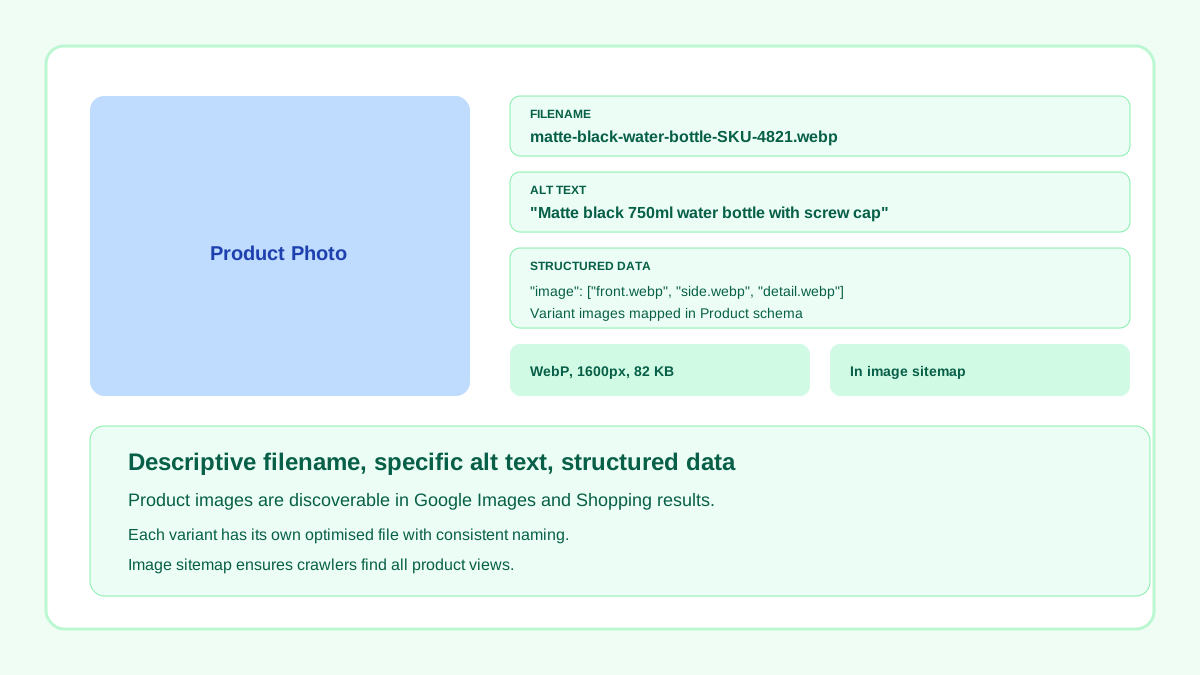
Descriptive filename, specific alt text, Product schema images, and sitemap coverage.
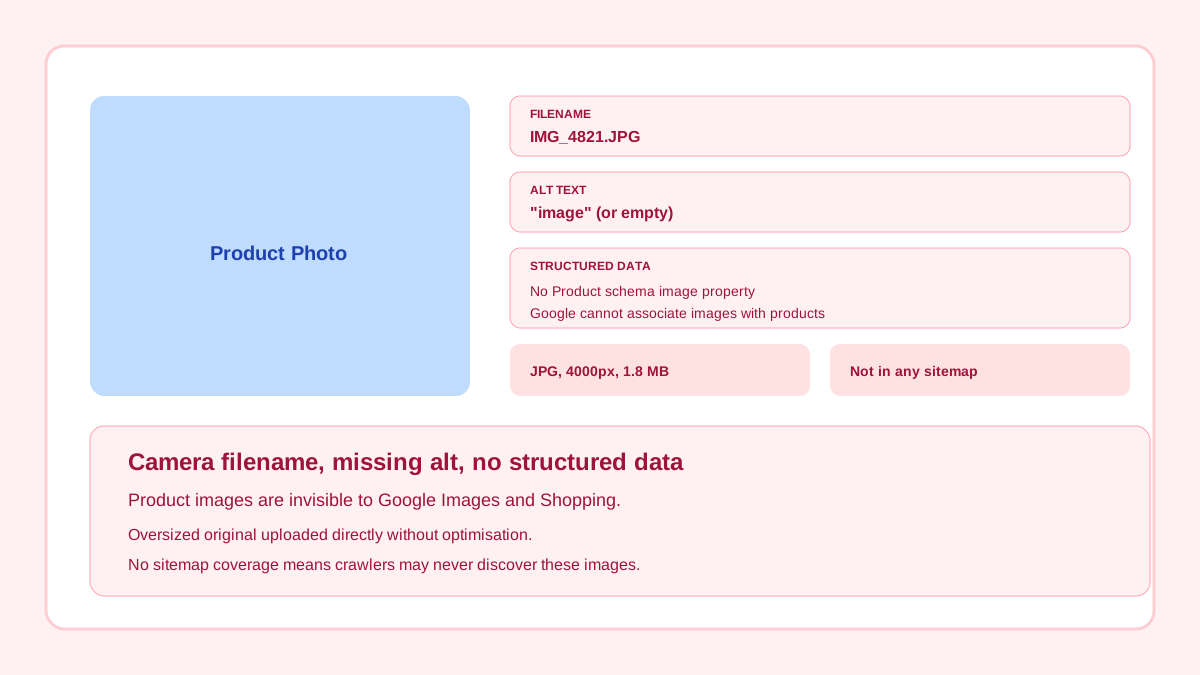
Camera filename, empty alt text, no structured data, oversized original.
Related workflow
Explore related tools to keep your workflow fast and consistent.
Keep moving
Run end-to-end variant and quality workflow for stores.
Open tool
Keep moving
Build placement-specific ecommerce variants.
Open tool
Keep moving
Help crawlers discover canonical product imagery.
Open tool
Keep moving
Apply practical presets for storefront performance.
Open tool
